



Battery Mode
10 likes
Replaces Windows default battery indicator to a more powerful and useful one.

Features
- Portable
- Battery Saving
Tags
- power-saving
- screen-brightness
- power-management
Battery Mode News & Activities
Highlights All activities
Recent activities
 OpenSourceSoftware added Battery Mode as alternative to PowerPlanSwitcher
Battery Mode information
Developed by
 Artyom Tarasov
 Licensing
Open Source and Free product.Alternatives
8 alternatives listedSupported Languages
- English
AlternativeTo Category
System & HardwareGitHub repository
- 378 Stars
- 24 Forks
- 35 Open Issues
- Updated


No comments or reviews, maybe you want to be first?
Featured in Lists
This is the apps for Windows 11 that I would recommend to anyone who just got a PC ! The same list for
List by Darlene Sonalder with 139 apps, updated
What is Battery Mode?
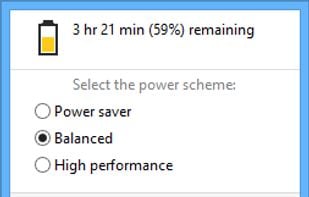
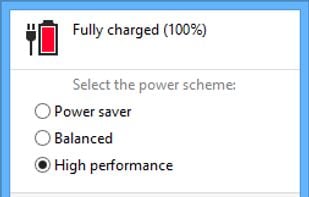
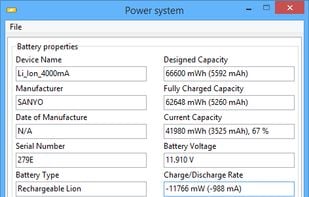
Replaces Windows default battery indicator to a more powerful and useful one. It provides backlight control, easy power scheme selection, detailed battery information and a lot of handy features for customization.
Advanced Power Scheme Selection
- Battery Mode allows you to change current power scheme right from the battery popup window.
- Unlike the standard popup in Windows 7-8.1, Battery Mode provides a full list of power schemes available on your system.
- You can setup a schedule to change power scheme automatically.
Comfortable Backlight Control
- You can use Battery Mode to control backlight on both internal and external monitors. Note: External monitors should support I2C interface and DDC/CI standard to work.
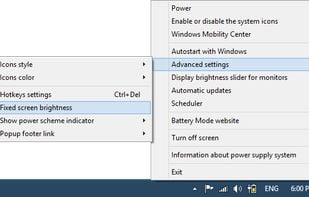
- Check the «Fixed screen brightness» option to prevent backlight level from changing when attaching power supply or changing power scheme.
- Brightness icon near back-light slider allows you to enable or disable «Adaptive brightness» (if your device support it).
Hotkeys for Power Users
- Battery Mode provides a customizable hotkey to change a power scheme without opening it's window.
- You can use NextScheme.exe utility to switch power scheme or control backlight in you scripts.