


ControlMyMonitor
2 likes
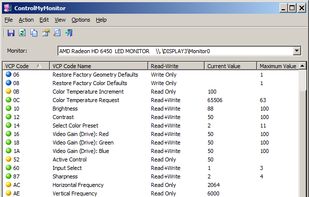
ControlMyMonitor allows you view and modify the settings of your monitor (Also known as 'VCP Features'), like brightness, contrast, sharpness, red/green/blue color balance, OSD Language, Input Port (VGA , DVI , HDMI ) and more...
Cost / License
- Free
- Proprietary
Platforms
- Windows

Features
No features, maybe you want to suggest one?
Tags
- screen-tool
ControlMyMonitor News & Activities
Highlights All activities
Recent activities
- K0RR added ControlMyMonitor as alternative to monitorcontrol (Python)
- vasylez liked ControlMyMonitor
ControlMyMonitor information
Developed by
 NirSoft
 Licensing
Proprietary and Free product.Alternatives
11 alternatives listedSupported Languages
- English


No comments or reviews, maybe you want to be first?
What is ControlMyMonitor?
ControlMyMonitor allows you view and modify the settings of your monitor (Also known as 'VCP Features'), like brightness, contrast, sharpness, red/green/blue color balance, OSD Language, Input Port (VGA , DVI , HDMI ) and more... You can modify the monitor settings from the GUI and from command-line. You can also export all settings of your monitor into a configuration file and then later load the same configuration back into your monitor.