


Convert MBOX to DOCX for Outlook
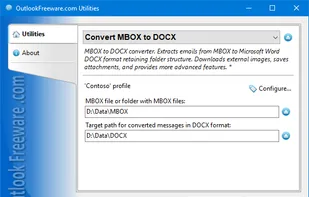
Free MBOX to DOCX converter. Extracts emails from MBOX to Microsoft Word DOCX format retaining folder structure. Downloads external images, saves attachments, and provides more advanced features.
Cost / License
- Free Personal
- Proprietary
Platforms
- Windows

Features
Tags
- outlook
- add-in
Convert MBOX to DOCX for Outlook News & Activities
Recent activities
Convert MBOX to DOCX for Outlook information
Developed by
 Relief, LLC
 Licensing
Proprietary and Free Personal product.Pricing
One time purchase (perpetual license) that costs $0.Alternatives
1 alternatives listedSupported Languages
- English
AlternativeTo Category
Office & Productivity
What is Convert MBOX to DOCX for Outlook?
Free MBOX to DOCX converter. Extracts emails from MBOX to Microsoft Word DOCX format retaining folder structure. Downloads external images, saves attachments, and provides more advanced features. - Converts any number of files from MBOX to Word DOCX format, allowing you to open and edit them without access to the Internet or email clients. - Preserves attachments, images, headers, hyperlinks, and original formatting of MBOX emails. - Supports any MBOX files, no matter what email client they were created in. - Supports MBOX email databases created with Google Takeout. Creates folders from Gmail labels. - Saves the structure of selected folders with MBOX files for conversion. - Allows you to use macros to arrange separate messages in DOCX format into folders the way you want. For example, you can automatically organize emails by creation date, sender or recipient data, and other parameters. - Allows you to define the margin size in resultant Word documents. - Allows the user to remove the CC and BCC from the header of the resultant files. - Converts multiple MBOX files to Word documents on schedule and in bulk from different folders using command line application for batch conversion. The most productive and safe way to export MBOX emails to Word documents is to do it directly using a special program on your own or office PC. The best solution is to use the reliable DOCX format, which retains the original message formatting and makes it possible to use all the editing features of Microsoft Word. With the full professional edition of the utility, you can convert multiple MBOX emails into any number of Word documents from various folders in batch mode. This can be done using the command line application. The application can work together with Windows Scheduler to convert MBOX to DOCX on schedule.