


Delete Folder Permissions for Outlook
Free tool for removing Outlook folder permissions for selected users in bulk. This utility removes selected users from permission lists of specified Outlook folders in Office 365, Exchange Server mailboxes and Exchange Public Folders.
Cost / License
- Free Personal
- Proprietary
Platforms
- Windows

Features
- Folders
Tags
- permissions
- add-in
- outlook
Delete Folder Permissions for Outlook News & Activities
Recent activities
Delete Folder Permissions for Outlook information
Developed by
 Relief, LLC
 Licensing
Proprietary and Free Personal product.Alternatives
1 alternatives listedSupported Languages
- English
AlternativeTo Category
Office & Productivity
What is Delete Folder Permissions for Outlook?
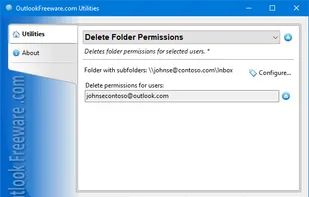
Free tool for removing Outlook folder permissions for selected users in bulk. This utility removes selected users from permission lists of specified Outlook folders in Office 365, Exchange Server mailboxes and Exchange Public Folders. The utility works with user permissions on folders of any type: mail, calendars, contacts, tasks and others. It allows you to revoke the permissions of selected and anonymous users, as well as default folder permissions. With standard Outlook tools, you cannot remove the desired users from multiple folders permissions at once – you must edit the permissions for each folder individually. Also, you cannot process multiple mailboxes or Exchange public folders. Outlook provides no way to edit the folder access rights by schedule and from the command line. Our utility extends Outlook’s capabilities for editing permissions of Outlook, Office 365, and Exchange Server folders. You just need to select the required folders in the mailbox, select the users removed from the access lists and run the utility. After you remove the user from the permission list, Outlook and Exchange automatically apply the default permissions. Thanks to the support of the command line, you can use the utility in batch files and scripts. This can be useful in various scenarios: from scheduled run to migrations and centralization of the management of access rights to Outlook and Exchange folders.