



Dot Calendar
Like
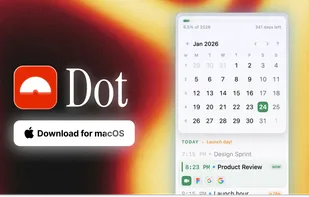
A full calendar in your Mac's menu bar. See what's next, join meetings instantly, and never forget an event again.
 EU
EU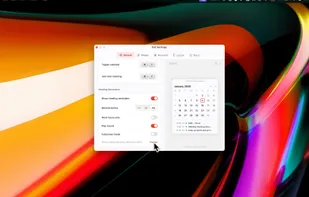

Features
Properties
- Privacy focused
- Customizable
Integrations
 Google Meet
 Webex
Webex ICloud
 Microsoft Teams
 Google Calendar
 Zoom
Zoom Outlook
Features
- Reminders
- Works Offline
- No registration required
- Ad-free
- No Tracking
- Sits in the MenuBar
- Support for Keyboard Shortcuts
- Natural Language Processing
- Exchange
Tags
Dot Calendar News & Activities
Highlights All activities
Recent activities
 POX added Dot Calendar as alternative to Fantastical, Notion Calendar, Scheduler - Calendar Widget and Itsycal
- POX added Dot Calendar

Dot Calendar information
Developed by
 Prateek Keshari
 Licensing
Proprietary and Commercial product.Pricing
One time purchase (perpetual license) ranging between $10 and $15.Alternatives
32 alternatives listedSupported Languages
- English



No comments or reviews, maybe you want to be first?
What is Dot Calendar?
A full calendar in your Mac's menu bar. See what's next, join meetings instantly, and never forget an event again.
Meeting reminders Meeting alerts. One-click join. Floating or fullscreen—your choice. Click to join Zoom, Meet, Teams, or Webex instantly.
Menu bar calendar A complete calendar in your menu bar. Browse, create, navigate—all one click away.
Meeting prep Links from your invite, surfaced automatically. No more digging.
And everything else
- All your calendars: iCloud, Google, Outlook, Exchange—anything in macOS Calendar
- Natural language events: Type "Lunch tomorrow at noon" and it just works
- Next event in menu bar: See title and countdown at a glance
- World clock: Time zones with day/night indicators
- Quick date jump: Press F, type date
- Copy meeting ID: One-click copy
- Date markers: Flag important days
- Keyboard first: Full keyboard nav
- No account needed: Just download and use, no signup required
- Privacy first: Data stays on your Mac, no servers
- Day & year progress: See time passing
- Fully customizable: Make it yours