



Droppy for macOS
Native macOS utility combining clipboard history with search, OCR, file shelf, floating basket, screenshot tools, customizable HUDs for system controls, and media playback management in a single unified, Swift-built, open-source interface for all Mac models.

Features
Properties
- Privacy focused
Features
- OCR
- No registration required
- Support for Multiple Monitors
- Works Offline
- Ad-free
- Supports Zip files
- Dark Mode
- No Tracking
- Extensible by Plugins/Extensions
- Remove Image Background
- Snap windows
- AirDrop Support
- File conversion
- File Compression
- Voice dictation
- Dictation
- Drag and Drop
- AI-Powered
- Heads-Up Display
- Extract text from image
Tags
- ai-background-remover
- File Sharing
- notch
- huds
- Productivity Tool
- Clipboard History
- voice-transcription
- Quick Look
- dynamic-island
- productivity
- airdrop
- File Upload
- media-controls
Droppy for macOS News & Activities
Recent activities
- jaybee22 reviewed Droppy for macOS
Great (free)app and already replaced 5+ apps from my system (Drop Over, Clipboard, Speech to Text, Menu bar manager, others) and the developer is responsive, replies within hours on discord/reddit.
- Taofeek2 A comment was removed from Droppy for macOS
 POX added Droppy for macOS as alternative to PasteFast

Droppy for macOS information
Developed by
UnknownLicensing
Open Source and Free product.Written in
Alternatives
81 alternatives listedSupported Languages
- English

AlternativeTo Categories
Office & Productivity, OS & Utilities, Photos & Graphics, File Management, File Sharing, Audio & Music, Backup & SyncGitHub repository
- 321 Stars
- 16 Forks
- 13 Open Issues
- Updated


What is Droppy for macOS?
The ultimate Mac productivity monster. Free, open-source, and built entirely in Swift.
What's Droppy?
The native productivity layer macOS is missing.
Stop juggling single-purpose utilities. Droppy brings your clipboard history, file shelf, screenshot tools, and system HUDs together in one native interface—all living inside your notch.
No notch? Droppy adds a Dynamic Island-style pill to any Mac. The basics:
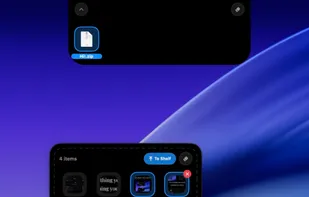
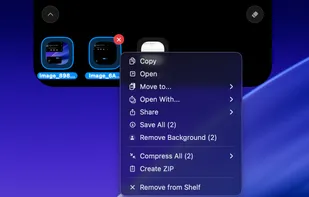
- Shelf & Basket — Drag files to the notch to stash them. Jiggle your mouse while dragging to summon a floating basket anywhere on screen.
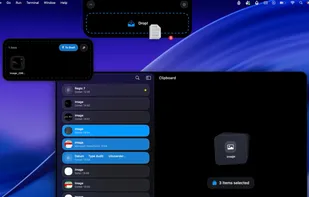
- Clipboard History — Full history with search, favorites, OCR text extraction, and drag-out.
- Native HUDs — Clean replacements for volume, brightness, battery, caps lock, and more.
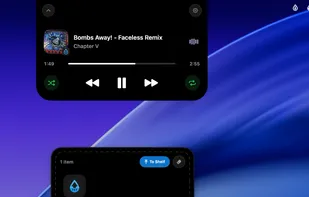
- Media Controls — Album art, playback controls, and a seek slider right in the notch.
Comments and Reviews
Great (free)app and already replaced 5+ apps from my system (Drop Over, Clipboard, Speech to Text, Menu bar manager, others) and the developer is responsive, replies within hours on discord/reddit.