


Duplicate Cleaner
Duplicate Cleaner is a tool for finding and removing duplicate files from your computer or network drives; It is intended to be used on user content - documents, photos, images, music, but can be used to scan any type of files.
Cost / License
- Pay once
- Proprietary
Application types
Platforms
- Windows

Features
- Duplicate File Finder
- Find similar images
- Portable
- Disk Maintenance
Tags
- file-duplicates
- Disk Cleaner
- duplicate-files
- duplicate-mp3-finder
Duplicate Cleaner News & Activities
Recent News
Recent activities
- jpeni added Portable as a feature to Duplicate Cleaner
- jpeni reviewed Duplicate Cleaner
Efficiently finds duplicate files. lists all files for easy identification and selection and provides many options for removing files.
 TheEmperorArt added Duplicate Cleaner as alternative to Glary Duplicate Cleaner
 TheEmperorArt added Duplicate Cleaner as alternative to Nero DuplicateManager
 Qoncept added Duplicate Cleaner as alternative to DuoBolt
 TheEmperorArt added Duplicate Cleaner as alternative to Aomei Partition Assistant for Cleanup
 TheEmperorArt added Duplicate Cleaner as alternative to EaseUS DupFiles Cleaner
 TheEmperorArt added Duplicate Cleaner as alternative to iBeesoft Duplicate Finder

Featured in Lists

A list with 809 apps by AmileyaRyver without a description.

A list with 35 apps by asphaltkisser without a description.

A list with 22 apps by alexandresmguerra without a description.
What is Duplicate Cleaner?
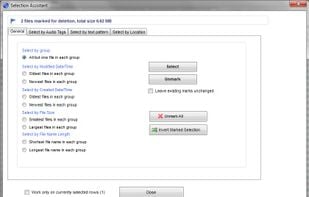
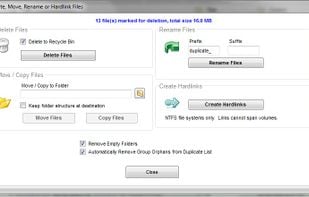
Duplicate cleaner is a useful program to help you organize the contents of your home hard drive or corporate network. Find and delete duplicate files, mp3s, photos, old documents and much more. Once these files are found you are provided with helper tools to enable you to select which copies to delete or move. These files can be deleted to the recycle bin, moved into an archive elsewhere, or replaced with hardlinks.
Features:
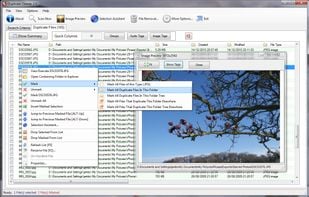
Find Duplicate Files by content, fast! Cleaner hard drives means faster performance Fast Scanning and accurate duplicate comparison (Uses the MD5 Hash algorithm) Deep scans music - locate duplicate music formats (MP3, iTunes, etc) Flexible search parameters Intelligent Selection Assistant Search home or networked drives Search multiple locations Export / Import results in CSV format View Path,Size and Date of files Large, resizable list window Image preview window Delete duplicate files to the Recycle bin Move dupe files to a new location Turn duplicate file into hard links (NTFS file systems only) Protection for Windows and system files Supports multiple languages
There's also a pro-version with even more features, which is also meant for commercial use.
Duplicate Cleaner information
Developed by
 DigitalVolcano Software Ltd
 Licensing
Proprietary and Commercial product.Pricing
One time purchase (perpetual license) that costs $43.Rating
Average rating of 4.1Alternatives
119 alternatives listedSupported Languages
- English



Comments and Reviews
This is great software if you buy the paid version. The free version is very basic and limited, even though it might be the best interface for those who want something simple and user-friendly.
But wanted to note that the free trial of the paid version is not fully functional: specifically, you can only delete from the first 100 groups of dupes found. This might not sound like much, but if you're doing a heavy cleaning, be aware that it is a huge pain.
But encourage to purchase if you like.
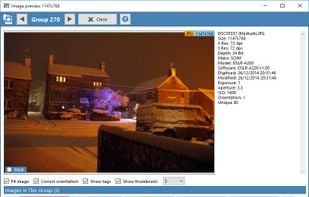
The "Official Website" link leads to https://digvolsoft.evyy.net/YRDe. The correct page appears to be https://www.digitalvolcano.co.uk/duplicatecleaner.html For photos (images) the Pro version is required. Even so, I find the open source dupeGuru better, because it allows duplicate images to be viewed side-by-side. Duplicate Cleaner's view option allows you to switch back and forth between the matches found, which also has its advantages. Duplicate Cleaner seems to display a little more EXIF metadata, but neither allows comparison of IPTC metadata, other than including it in the percent match rating
Efficiently finds duplicate files. lists all files for easy identification and selection and provides many options for removing files.
Duplicate Cleaner interface makes it very easy to start looking for duplicates. You can narrow your search by file type, sizes, dates and more.Smart selection assistant.Find home or network drives .Search multiple locations Andrew
it seems to have a lot of features, but I've just uninstalled because the trial version won't let me delete more than 100 groups (100 files in my case)
Great tool to remove duplicate songs / musics via audio fingerprinting technology.
My favourite "unduplicator"! The free version is fine, being both intuitive and pretty quick. It has lots of ways to manipulate and select files needing removal. Modern hard drives have vast capacity so there's less pressure to remove duplicates than years ago, but for anyone keen to keep their computer as efficient and uncluttered as possible, this tool is a must-have.