


Encrypted Clipboard Manager
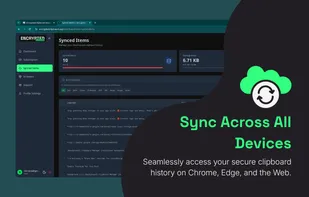
A premium, Zero-Knowledge encrypted clipboard manager for Chrome and Chromium browsers that lives in your Side Panel. Securely sync text, code, and images across all your devices with a focus on privacy and productivity.

Cost / License
- Subscription
- Proprietary
Platforms
- Google Chrome
- Brave
- Microsoft Edge
- Chromium

Features
Properties
- Privacy focused
- Lightweight
Features
- Cloud Sync
- No Tracking
- Dark Mode
- No registration required
- Works Offline
- Ad-free
- Full-Text Search
- Browser extension
Encrypted Clipboard Manager News & Activities
Recent activities
- nhrdev added Encrypted Clipboard Manager
- nhrdev reviewed Encrypted Clipboard Manager
I personally use this extension especially for it's most secure E2E encrypted multi device sync feature, it's just solves my everyday pain
- nhrdev liked Encrypted Clipboard Manager
 nhrdev added Encrypted Clipboard Manager as alternative to CopyCat Clipboard, CopyQ, PasteBar and ClipPocket
Encrypted Clipboard Manager information
Developed by
 Nowshad Hossain Rahat
 Licensing
Proprietary and Commercial product.Pricing
Subscription that costs up to $60 per month.Alternatives
9 alternatives listedSupported Languages
- English


What is Encrypted Clipboard Manager?
Encrypted Clipboard Manager (ECM) is a professional-grade browser extension designed for developers, researchers, and privacy-conscious users who need to manage their clipboard history without compromising security.
Unlike traditional clipboard managers that store your data in plain text or sync via insecure cloud methods, ECM utilizes a Zero-Knowledge Architecture. Your data is end-to-end encrypted (E2E) locally on your device before it ever touches the cloud. Only you hold the encryption keys, ensuring total privacy.
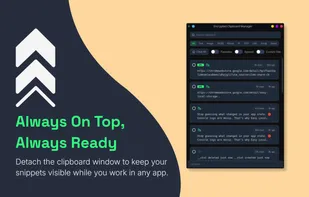
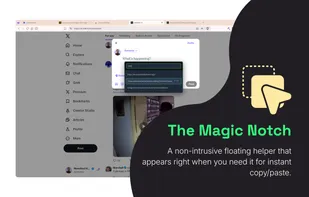
Integrated natively into the Chrome Side Panel API, ECM provides a persistent workspace that stays accessible alongside your active tabs for a seamless, "zero-lag" multitasking experience. For power users, the Instant Floating Clipboard (Magic Notch) provides contextual access to your history directly within any webpage, allowing you to interact with your clips without breaking your flow.
ECM isn't just for text - it fully supports encrypted image syncing and code snippets, making it the ultimate tool for moving assets between your desktop and laptop browsers securely.
Comments and Reviews
I personally use this extension especially for it's most secure E2E encrypted multi device sync feature, it's just solves my everyday pain