



Flutter Advanced Scientific Calculator
2 likes
The Calculator app, developed by Pabitra Banerjee, is a versatile and feature-rich tool designed to cater to a wide range of mathematical needs. This lightweight and open-source application is crafted with a focus on user privacy, usability, and functionality.

Cost / License
- Free
- Open Source (MIT)
Platforms
- Android
- iPhone

+1

Flutter Advanced Scientific Calculator
2 likes
Features
Properties
- Lightweight
Features
- No registration required
- Dark Mode
- Works Offline
- Ad-free
Tags
- advanced-scientific-calculator
- flutter-calculator
- flutter-apps
- flutter-app
- calculator-application
- scientific-calculator-app
- flutter-calculator-app
- pabitra-banerjee
- scientific-calculator
- flutter
Flutter Advanced Scientific Calculator News & Activities
Highlights All activities
Recent activities
- namdx1987 liked Flutter Advanced Scientific Calculator
Flutter Advanced Scientific Calculator information
No comments or reviews, maybe you want to be first?
What is Flutter Advanced Scientific Calculator?
Calculator App Features This lightweight calculator app offers a robust and versatile user experience while maintaining a minimalist and user-friendly design. Here’s a detailed look at its features:
- Lightweight and Secure No User Data Collection: This app ensures complete privacy as it does not collect any user data. Open-Source: The project is open-source, allowing users to review, modify, and enhance the code.
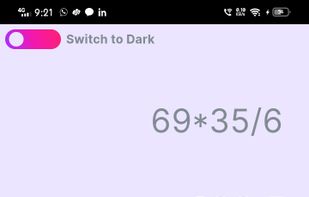
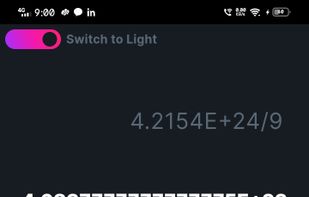
- User Interface Light Mode and Dark Mode: Users can switch between light and dark themes to suit their preferences and reduce eye strain. Responsive Input Font Size: The input font size dynamically adjusts based on the length of the input, ensuring readability at all times.
- Functionality Basic Arithmetic Operations: Supports addition, subtraction, multiplication, and division. Advanced Mathematical Functions: Trigonometric functions (sin, cos, tan, and their hyperbolic and inverse variants) Logarithmic functions (log, log10) Power functions (x², x³, x?, 2?, e?) Factorial (x!) Absolute value (|x|) Square root (v) Angle Unit Toggle: Users can switch between radian and degree modes for trigonometric calculations. Brackets Management: Smart handling of parentheses for complex expressions. Change Sign: Easily change the sign of numbers within expressions. Constants: Includes mathematical constants like p and e.
- Usability Enhancements History Functionality: Keeps a record of previous calculations for easy reference. Scrollable Input Field: The input field is scrollable to manage longer expressions efficiently. Cursor Management: Facilitates easy editing of expressions by allowing insertion and deletion at the cursor position.
- User Interaction Function Buttons: Includes buttons for commonly used functions like v, 1/x, and e?. Power and Exponentiation: Allows for easy exponentiation using x?, x², and x³. Toggle Buttons: Switch between various modes (e.g., landscape row switch, angle type switch).
- Error Handling Approximate Result Calculation: The app provides approximate results for expressions, formatted to five decimal places. It also ensures that results are displayed in the simplest form (e.g., converting floating-point results to integers when possible).
- Intuitive Controls Delete and Clear: Easily delete the last character or clear the entire input. Cursor Positioning: Maintains cursor position during edits for seamless user experience.
- Special Features Function Addition with Multiplication: Automatically adds a multiplication operator when functions or constants are added to ensure correct expression formatting. Auto Bracket Closure: Ensures that opened parentheses are closed appropriately to prevent syntax errors.