



Light Alloy
Light Alloy is a multimedia player for Windows.
Features
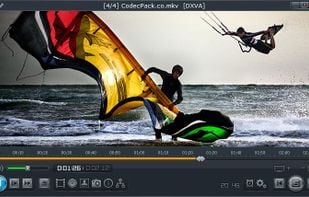
Timeline So you can see graphically how much is played and how much is still to play
WinLIRC Allows you to remotely control Light Alloy, for example if you are laying on the sofa
Live.
The latest version (4.11.2) was released in April 2021.

Features
- Integrated Codecs
- Support for IPTV
- Automatic subtitles download
- Media Streaming
- Internet Radio
- Radio Player
- Playlists management
- Multiple languages
- Support for subtitles
Tags
- Record Internet Radio
- preview-video
- dvd-player
- blu-ray-player
- Radio Stations
Light Alloy News & Activities
Recent activities
- Anonim1488 reviewed Light Alloy
Pluses: Easy launch; Ability to successfully open a large number of videographic files (for example, the flagship of the media programming industry - Cyberlink PowerDVD flatly refuses to work with the format .TS); A wide selection of program settings with explanatory comments; Advanced for the 2000s and the best even in the 2020s Timeline player with % viewing of the videography, time from the beginning, at the moment of pause to the end of the file, with a miniature, frame-by-frame preview...
- Anonim1488 updated Light Alloy
 ALTERRA added Light Alloy as alternative to Infuse
 robert-timsah added Light Alloy as alternative to Serene Video
 POX added Light Alloy as alternative to Submarine Player
 POX added Light Alloy as alternative to LLPlayer
Light Alloy information
Developed by
Vortex Group, LLC.Licensing
Proprietary (GPL-2.0) and Free product.Alternatives
56 alternatives listedSupported Languages
- English
AlternativeTo Categories
Video & Movies, Audio & Music, CD/DVD ToolsGitHub repository
- 28 Stars
- 8 Forks
- 0 Open Issues
- Updated



What is Light Alloy?
Light Alloy is a multimedia player for Windows.
Features
Timeline So you can see graphically how much is played and how much is still to play
 WinLIRC
Allows you to remotely control Light Alloy, for example if you are laying on the sofa
WinLIRC
Allows you to remotely control Light Alloy, for example if you are laying on the sofa
Live Preview Just like on YouTube you can navigate with a preview window while searching on the timeline
IPTV support Allows you to watch tv over the internet and online videos like youtube/vimeo
Internet Radio Contains an expandable list of online radio stations which you can play and record, and a list to store your favorites
Streams switch In case of multiple audio/subtitles streams you can easily switch from stream
Multilingual Contains Dutch, German, Russian, Japanese, Chinese, and others
Built-in codecs You don't have to install a codec pack anymore: you can use the player immediately after installation
Blu-Ray & DVD You also can watch Blu-Ray and DVD with Light Alloy
Comments and Reviews
Pluses: Easy launch; Ability to successfully open a large number of videographic files (for example, the flagship of the media programming industry - Cyberlink PowerDVD flatly refuses to work with the format .TS); A wide selection of program settings with explanatory comments; Advanced for the 2000s and the best even in the 2020s Timeline player with % viewing of the videography, time from the beginning, at the moment of pause to the end of the file, with a miniature, frame-by-frame preview window (very convenient, unlike players where you have to go first for a time period and only then see the visualization); Ability to open the full screen, launch the next/previous videography, start, pause when the player is minimized thanks to the built-in miniature panel directly on the Windows taskbar.
Minuses: Lack of memorization of the time interval on the videography during the previous viewing; Lack of a built-in or proposed association of the videographic player with file formats, which must be configured manually each time, through the «Properties» category, each format separately; MAIN minus - a technical problem with DirectX. The program will display a small error window «install DirectX files from june 2010 year» every time you start the videography. Successful installation of these files will not do ANYTHING, even having them (files) on your PC will not save the Light Alloy videographic player from the annoying error window. Even worse, this procedure can lead to file CONFLICTS on your PC. I had critical damage to the files of the Uninstall Tool program, without the possibility of repair or restoration, I had to completely remove it from my computer and install it from scratch.
It's really pretty, and I really want to like it. It offers some impressive features, but unfortunately it's caused 2 of my higher end machines to crash on 5 separate occasions. That disappoints me because it's SO PRETTY, kicking VLC's skinned (or native) interface to the curb.
But I like having a working machine, so back to VLC and Pot Player I go.