



MacMulator
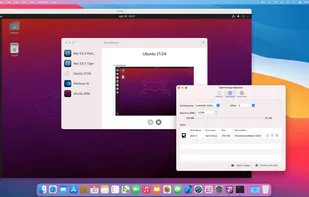
MacMulator is the computer emulator for your Mac! It engages the power of Qemu, together with a nice, easy to use UI, to let you create any kind of Virtual Machines in a few clicks. Whatever OS you need to run on your Mac, MacMulator is the tool for you!.
Cost / License
- Free
- Open Source (Apache-2.0)
Platforms
- Mac

Features
- Emulation
Tags
- Windows Emulator
- windows-emulation
- QEMU
- linux-emulator
MacMulator News & Activities
Recent activities
- justarandom added MacMulator
 justarandom added MacMulator as alternative to VirtualBox, WinBoat, QEMU and VMware Workstation Pro
MacMulator information
Developed by
vale21Licensing
Open Source (Apache-2.0) and Free product.Written in
Alternatives
49 alternatives listedSupported Languages
- English




What is MacMulator?
MacMulator is the computer emulator for your Mac! It engages the power of Qemu and Apple Virtualization Framework, together with a nice, easy to use UI, to let you create any kind of Virtual Machines in a few clicks. Whatever OS you need to run on your Mac, MacMulator is the tool for you!
MacMulator is a Universal app that works on Intel and Apple Silicon macs. It is able to recognize its host hardware and optimize the guest OS running in the operating system, to run it at almost native speed where possible. Whenever possible, it uses Apple Virtualization Framework to create a performant VM that enables 3D graphics and leverages macOS native features. For Qemu based VMs, It does not bundle Qemu executables, so it is very light, and lets you use the Qemu version you prefer. You have just to tell it where to find Qemu in your local machine, and you are ready to go.
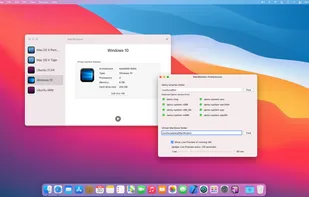
Lets you create and run a VM in a few minutes, and with a few clicks Uses Apple Virtualization Framework to create native macOS VMs whenever possible (With Linux guests on macOS Ventura and higher, with macOS guests on macOS Monterey and higher, on Apple Silicon hosts) With Qemu, uses Apple Hypervisor to speed up your VM if the guest architecture is the same as the host one Emulates Intel, ARM, PowerPc and Motorola 68k and lets you install any kind of OS that works on these hardwares Lets you use the Qemu version you prefer, so that you can be very flexible. You can also custoimize the Qemu version for each VM If you are a pro user, lets you customize the Qemu command freely. MacMulator will use your version of the command in place of its own Vms are self contained and portable, very easy to share