



MBR2GPT
MBR2GPT.EXE converts a disk from the Master Boot Record (MBR) to the GUID Partition Table (GPT) partition style without modifying or deleting data on the disk.
Cost / License
- Free
- Proprietary
Platforms
- Windows

Features
- MBR
Tags
- uefiboot
- uefi
- GPT
- windows-11
MBR2GPT News & Activities
Recent activities
 TheEmperorArt added MBR2GPT as alternative to iBeesoft Disk Partition Wizard
MBR2GPT information
Developed by
UnknownLicensing
Proprietary and Free product.Alternatives
6 alternatives listedSupported Languages
- English


What is MBR2GPT?
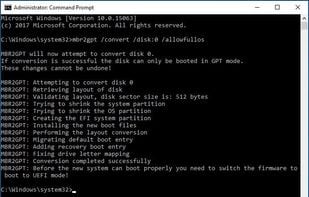
MBR2GPT.EXE converts a disk from the Master Boot Record (MBR) to the GUID Partition Table (GPT) partition style without modifying or deleting data on the disk. The tool is designed to be run from a Windows Preinstallation Environment (Windows PE) command prompt, but can also be run from the full Windows 10 operating system (OS) by using the /allowFullOS option. You can use MBR2GPT to: Convert any attached MBR-formatted system disk to the GPT partition format. You cannot use the tool to convert non-system disks from MBR to GPT. Convert an MBR disk with BitLocker-encrypted volumes as long as protection has been suspended. To resume BitLocker after conversion, you will need to delete the existing protectors and recreate them. Convert operating system disks that have earlier versions of Windows 10 installed, such as versions 1507, 1511, and 1607. However, you must run the tool while booted into Windows 10 version 1703 or later, and perform an offline conversion. Convert an operating system disk from MBR to GPT using Configuration Manager or MDT provided that your task sequence uses Windows PE version 1703 or later. Offline conversion of system disks with earlier versions of Windows installed, such as Windows 7, 8, or 8.1 are not officially supported. The recommended method to convert these disks is to upgrade the operating system to Windows 10 first, then perform the MBR to GPT conversion.