


pdf.to.design
Like
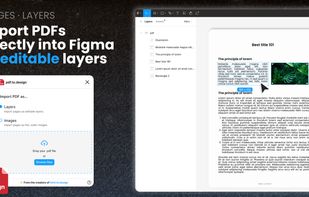
Convert any PDF document into Figma designs. Import your PDF into Figma as designs with fully editable layers, or as static, pixel-perfect images.
Cost / License
- Free
- Proprietary
Platforms
- Figma
- Online

pdf.to.design
Like
Features
- Ad-free
- No registration required
- Figma plugin
- Edit PDF
 Figma Integration
Tags
- design-tools
pdf.to.design News & Activities
Highlights All activities
Recent activities
No activities found.
pdf.to.design information
No comments or reviews, maybe you want to be first?
What is pdf.to.design?
Convert any PDF document into Figma designs.
Import your PDF into Figma as designs with fully editable layers, or as pixel-perfect images. All PDF files are processed on your local machine by the plugin and are never sent to any server.
How to import a PDF into Figma (and edit it):
- Run this plugin, pdf.to.design.
- Select the way you want to import your PDF: with editable layers or as static images.
- Drag-and-drop your PDF document(s) into the plugin.
- In a few seconds you’ll have your PDF directly in Figma.
Why use pdf.to.design?
- Extract images and text from your PDFs and get them straight into Figma.
- Collaborate on PDF documents with your team in Figma.
- Use PDFs as templates for new designs in Figma.
- And much more!