



PrintX
1 like
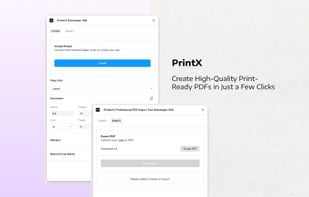
Use Figma to generate professional print documents effortlessly, without the need for complex and expensive tools.
Cost / License
- Free
- Proprietary
Platforms
- Online
- Figma

Features
- Support for CMYK Mode
- Ad-free
- Presets
- Export to PDF
- Bleeding edge
- Figma plugin
- High-dpi support
Tags
- pdf-for-print
- crop-marks
- figma
- print-ready-files
- margins
- figma-cmyk
PrintX News & Activities
Highlights All activities
Recent activities
No activities found.
PrintX information
Developed by
Cooders PixelLicensing
Proprietary and Free product.Alternatives
2 alternatives listedSupported Languages
- English

No comments or reviews, maybe you want to be first?
What is PrintX?
Use Figma to generate professional print documents effortlessly, without the need for complex and expensive tools.
- Generate Print-Ready PDFs: Produce professional-grade PDFs that are ready for print.
- CMYK PDF Export (Automatically): Export your files in CMYK color mode for top-tier print quality.
- 300 DPI management tool: Ensure your images maintain perfect clarity with the built-in DPI management tool.
- Bleed and Crop Marks Support: Easily add and configure bleed and crop marks to your documents.
- Customizable Presets: Save and load custom presets to speed up your design-to-print workflow.
Key Features:
- Multiple Presets: Choose from standard paper sizes or create your own, including: Letter, Legal, Ledger ... A1, A2, A3, A4, A5, A6 ...
- One-Click PDF Creation: Select your dimensions, customize page options (margins, bleed, crop marks), and let PrintX handle the rest. It calculates the frames and guides automatically for you.
How to Use:
- Select Your Frame: Pick a preset size or enter custom dimensions to start.
- Adjust Settings: Configure margins, bleed, and crop marks for precision printing.
- Export: Choose your color mode and export a ready-to-print PDF directly from Figma.
Quick Tips:
- Enable layout guides (Ctrl/CMD-Shift-4) to view bleed and margin guides clearly.
- Save time with customizable export presets tailored to your specific needs.