



RemoveWindowsAI
PowerShell tool for Windows 11 automates disabling and removing Copilot, Recall, AI Actions, typing insights, and AI integrations in system apps, deletes non-removable AI packages and files, installs update package for persistence, and offers a GUI for easy toggles.

Features
Properties
- Lightweight
Features
- No registration required
- Works Offline
- Dark Mode
- Ad-free
- Portable
- No Tracking
- System Tweaker
- Bloatware Remover
- Software Uninstallers
Tags
- debloat
- recall
- Generative AI
- image-creator
- optimizer
- Security
- windows
- copilot
- rewrite
- powershell
- No bloatware
- AI
- bloatware-removal
RemoveWindowsAI News & Activities
Recent activities
 Maoholguin added RemoveWindowsAI as alternative to Microsoft to Microslop
Featured in Lists

This is the apps for Windows 11 that I would recommend to anyone who just got a PC ! The same list for
What is RemoveWindowsAI?
RemoveWindowsAI is a PowerShell script for Windows 11 25H2 and later that disables and removes Microsoft AI features and related components. It targets  Microsoft Copilot,
  Windows Recall, AI Actions, Input Insights and typing data collection, and AI integrations in apps such as
  Microsoft Edge,
  Microsoft Paint,
  Windows Notepad, Voice Access, and Settings search.
The script applies registry and policy changes, removes AI Appx packages including non removable packages, removes the Recall optional feature, deletes remaining AI files and installers, and removes Recall scheduled tasks. To help prevent removed AI packages from coming back, it can install a custom Windows Update package and disable Copilot and Recall policies, including changes to IntegratedServicesRegionPolicySet.json.
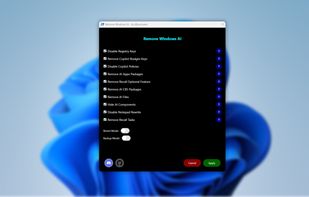
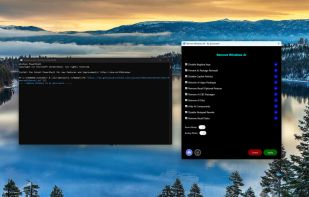
A GUI is also available for users who prefer toggles instead of running the script from the console, and it includes guidance for features that require manual changes.
RemoveWindowsAI information
Developed by
zoicwareLicensing
Open Source (MIT) and Free product.Alternatives
27 alternatives listedSupported Languages
- English
AlternativeTo Categories
OS & Utilities, Security & Privacy, Web Browsers, AI Tools & ServicesGitHub repository
- 8,906 Stars
- 280 Forks
- 5 Open Issues
- Updated


Comments and Reviews
It removes this useless AI crap.
Run to check PowerShell version: $PSVersionTable.PSVersion Then run script. Reap benefits.
This is the kind of thing that gets created when people aren't willing to cut ties with the person doing bad things to them. Digital Stockholm Syndrome.
How safe is this tool and how effective is it and does it download anything I should worry about. This looks good though?