



Screenity
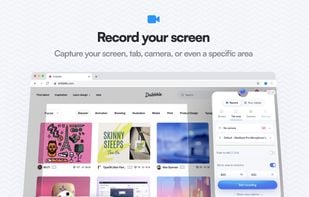
Screenity is a privacy-friendly screen recording and annotation tool for Chromium browsers (Chrome/Edge/Brave). It supports screen, tab, and camera recording with microphone and/or system audio, plus built-in annotation tools while recording.
Cost / License
- Freemium
- Open Source (GPL-3.0)
Application types
Platforms
- Microsoft Edge
- Google Chrome
- Brave
- Chromium

Features
Properties
- Lightweight
- Privacy focused
Features
- Screen Recording
- Audio Recording
- Works Offline
- Browser extension
- Ad-free
- Support for 4K
- No registration required
- Non Destructive Editing
- Picture in Picture
- Keyframe Animation
- Color Picker
- Share Videos
- Webcam recording
Tags
- Microphone
- annotation
- Google Chrome Extension
Screenity News & Activities
Recent News
Recent activities
- Legendario liked Screenity
- alyssaxuuly updated Screenity
 POX added Screenity as alternative to Boom Share AI
- AltRazel liked Screenity
 cursorclip added Screenity as alternative to CursorClip
- gingamuffin liked Screenity
 POX added Screenity as alternative to OpenScreen


What is Screenity?
Screenity is a privacy-friendly screen recording and annotation tool for Chromium browsers (Chrome/Edge/Brave). It supports screen, tab, and camera recording with microphone and/or system audio, plus built-in annotation tools while recording.
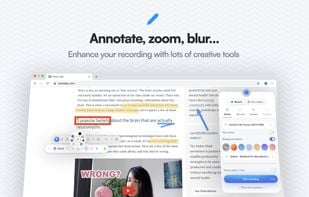
Features include cursor and click highlighting, blur tools for sensitive content, zoom/area emphasis, countdowns, and controls to hide or reposition UI elements. Recordings can be saved locally and used offline.
Screenity is open source (GPL-3.0) and the extension source code is available on GitHub.
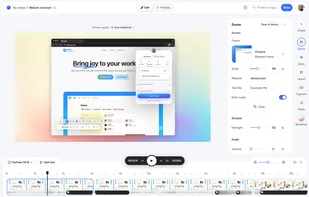
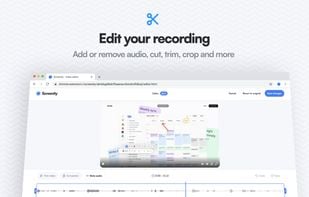
Optional Pro platform (paid) adds a web editor with advanced features such as multi-scene projects, templates, auto-generated captions, and automated zooms/keyframes, plus cloud storage and shareable links.
Screenity Videos
Screenity information
Developed by
 Alyssa X
 Licensing
Open Source (GPL-3.0) and Freemium product.Pricing
free version with limited functionality.Written in
Rating
Average rating of 4.2Alternatives
14 alternatives listedSupported Languages
- English
- Catalan; Valencian
- Spanish
- Portuguese
- Italian
- Chinese
- Russian
- Ukrainian
- Tamil
- Hindi
- Indonesian
- German
- French
- Korean
- Polish
- Turkish

AlternativeTo Categories
Video & Movies, Photos & Graphics, Web Browsers, Audio & MusicGitHub repository
- 17,838 Stars
- 1,431 Forks
- 15 Open Issues
- Updated



Comments and Reviews
Easier to use than OBS and can be used without requiring the installation of a software. Awesome in environments that don't allow the installation of a dedicated screen recording software.
Better than Streamlabs for productivity-focused recordings, however not available for other browsers based on Firefox, or WebKit.
Open source with premium features for free.