

Send to myself
Like
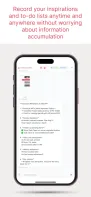
Always sync your info on all your devices, just like your info flows around you.

+2

Cost / License
- Freemium (Subscription)
- Proprietary
Platforms
- Mac
- Windows
- Linux
- Android
- iPhone
- iPad
- Android Tablet

Features
- No registration required
- Image Sharing
- Multi Device Support
- Synchronization
- Cross-Platform
Tags
- File transfer
- ai-memory
- share-links
- File Sharing
Send to myself News & Activities
Highlights All activities
Recent activities
 POX added Send to myself as alternative to DroidDock
 visionwise-nick added Send to myself as alternative to GSConnect and WiFi File Transfer
 visionwise-nick added Send to myself as alternative to LanXchange, XitLabs Bridge, Android File Transfer and WiFi File Explorer Pro
 visionwise-nick added Send to myself as alternative to Arc File Sharing by Quadren
 visionwise-nick added Send to myself as alternative to Sweech and TrebleShot
 visionwise-nick added Send to myself as alternative to Send Anywhere
 visionwise-nick added Send to myself as alternative to Intel Unison and Soduto
- visionwise-nick added Send to myself
- POX updated Send to myself
 visionwise-nick added Send to myself as alternative to KDE Connect, Blip, Join and ntfy
Send to myself information
Developed by
 silong.xiong
 Licensing
Proprietary and Freemium product.Pricing
Subscription that costs $2 per month + free version with limited functionality.Alternatives
74 alternatives listedSupported Languages
- English
- French
- German
- Spanish
- Japanese
- Chinese
AlternativeTo Categories
Backup & Sync, File SharingApple AppStore
- Updated
- 0 avg rating


No comments or reviews, maybe you want to be first?
What is Send to myself?
Send To Myself — Cross-Device File Sharing & Memory Assistant
Seamlessly connect your devices to transfer files securely and manage your digital memory intelligently. Designed for individuals, families, and professionals who value productivity and privacy. With end-to-end encryption and local-first storage, your data stays protected. Works offline and syncs automatically once you're back online.
Core Capabilities
- Cross-Device Transfer: Quickly share photos, videos, documents, and any files across mobile and desktop
- Smart Message Sync: Keep conversations up to date across all devices—never lose important info
- Memory Management: AI-assisted categorization and search to save, organize, and retrieve key information
- Group Collaboration: Create family or team groups for effortless file and album sharing
- Security & Privacy: End-to-end encryption, local storage, and automatic cleanup options
- Offline Sync: Use the app offline and it will sync changes automatically when reconnected
Ideal Use Cases
- Instantly move work files between phone and computer
- Continue editing and handing off information across devices
- Share albums, videos, and documents within families or teams
- Use AI to organize and search scattered notes and ideas
Privacy & Compliance
- End-to-end encryption with a local-first approach
- Optional auto-cleanup to minimize footprint
- See Privacy Policy and Terms on the website footer