

SlideDeck AI
SlideDeck AI is a powerful assistant designed to eliminate the hours spent manually creating and organizing presentation slides. By leveraging cutting-edge Large Language Models (LLMs), it allows users to co-create stunning, professional PowerPoint decks through a simple...
Cost / License
- Free
- Open Source (MIT)
Platforms
- Mac
- Windows
- Linux
- Self-Hosted
- Python
SlideDeck AI
Features
Properties
- Distraction-free
- Lightweight
- Privacy focused
Features
- No Tracking
- No Coding Required
- No registration required
- Dark Mode
- Marketing Automation
- Works Offline
- AI-Powered
- Slideshow Maker
- Offline
Tags
- hackathon
- sambanova
- anthropic
- azure-openai
- gemini-api
- powerpoint-presentations
- gemini-flash
- streamlit
- Artificial intelligence
- litellm
- llama
- togetherai
- bert
- Presentation
- pypi
- openrouterai
- pdf-import-export
- gemini-ai
- Ollama
- Generative AI
- powerpoint
SlideDeck AI News & Activities
Recent activities
- niksavc liked SlideDeck AI
- 1barun added SlideDeck AI
- POX updated SlideDeck AI
SlideDeck AI information
Developed by
barun-sahaLicensing
Open Source (MIT) and Free product.Written in
Alternatives
0 alternatives listedSupported Languages
- English

AlternativeTo Categories
AI Tools & Services, Office & Productivity, Photos & Graphics, Social & CommunicationsGitHub repository
- 316 Stars
- 52 Forks
- 15 Open Issues
- Updated
What is SlideDeck AI?
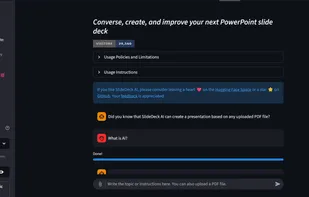
SlideDeck AI is a powerful assistant designed to eliminate the hours spent manually creating and organizing presentation slides. By leveraging cutting-edge Large Language Models (LLMs), it allows users to co-create stunning, professional PowerPoint decks through a simple, conversational workflow.
How it works:
- Content Generation: Describe a topic or upload a PDF, and the AI generates structured slide content.
- Visual Enhancement: The tool automatically searches for and integrates relevant images based on the content.
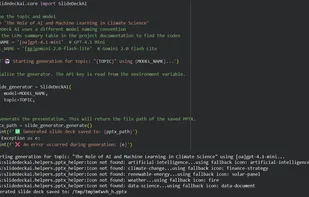
- Professional Assembly: Using the python-pptx library, it builds the deck using pre-defined professional templates.
- Iterative Refinement: Users can chat with the AI to add slides, modify text, or refine the layout until the deck is perfect.
- Instant Download: Export your finished presentation directly to a .pptx file.
Key Features:
?Unmatched Model Flexibility: Supports a wide array of providers including Google Gemini, OpenAI (GPT-4o), Anthropic (Claude), Azure OpenAI, Together AI, SambaNova, and OpenRouter. ? Ultimate Privacy (Offline Mode): Supports self-hosted LLMs via Ollama for organizations with strict data privacy requirements. ?PDF to Presentation: Automatically summarizes and converts long documents into concise, visual slide decks. ?Open Source: Fully transparent code, ensuring your API keys and data remain secure.