



SourceSeeker AI
Like
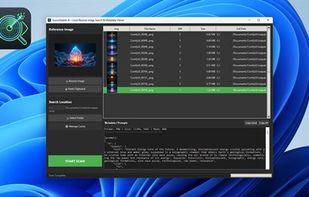
Find original high-res photos using visual search. Organize local files and view AI generation data.
Cost / License
- Pay once
- Proprietary
Platforms
- Windows

SourceSeeker AI
Like
Features
Properties
- Privacy focused
- Lightweight
Features
- Ad-free
- Batch Editing
- Decentralized
- Works Offline
- No registration required
- No Tracking
- Reverse Image Search
- RAW Photo Editors
- Built-in viewer
- File Search
Tags
- Stable Diffusion
- flux-ai
- comfyui
SourceSeeker AI News & Activities
Highlights All activities
Recent activities
- mlogictech added SourceSeeker AI
SourceSeeker AI information
Developed by
 mlogictech
 Licensing
Proprietary and Commercial product.Pricing
One time purchase (perpetual license) that costs $3.Alternatives
0 alternatives listedSupported Languages
- English
No comments or reviews, maybe you want to be first?
What is SourceSeeker AI?
Stop scrolling through thousands of filenames. Find the image you need visually. SourceSeeker AI is a powerful, privacy-focused utility designed for digital artists, photographers, and archivists. Unlike standard search tools that look for file names, SourceSeeker analyzes the content of your images to find matches, even if the filename has been changed or the image has been resized.
- Visual Search Engine: Drop a low-res preview or screenshot to find the original high-quality file on your hard drive.
- Privacy First: All scanning happens 100% offline on your device. No images are uploaded to the cloud.
- Smart Caching: Uses a high-performance SQLite database to make repeated scans of large folders instant.
- AI Metadata Reader: Specifically built for AI Artists—view and copy prompts, seeds, and workflow data from images created with Stable Diffusion, Automatic1111, or ComfyUI.
- Workflow Efficiency: Right-click to open file locations, copy generation data, or delete duplicates directly from the app.
- Right click direct locate file
