



Timestamp Bookmarks for YouTube
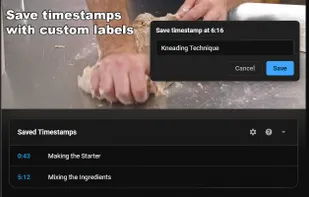
Timestamp Bookmarks for YouTube lets you save and label moments in any YouTube video. Click the bookmark icon in the player controls, use the keyboard shortcut (Alt+S), or save from the popup.
Cost / License
- Freemium (Subscription)
- Proprietary
Platforms
- Google Chrome
- Mozilla Firefox

Features
- Timestamps
- Bookmarks
- Browser extension
Tags
- Productivity Tool
- productivity
- Research
- videos
- YouTube
- learning
Timestamp Bookmarks for YouTube News & Activities
Recent activities
- JollyGoodApps liked Timestamp Bookmarks for YouTube
- JollyGoodApps updated Timestamp Bookmarks for YouTube
- JollyGoodApps added Timestamp Bookmarks for YouTube
 JollyGoodApps added Timestamp Bookmarks for YouTube as alternative to Play and Watch It Later
Timestamp Bookmarks for YouTube information
Developed by
 Jolly Good Apps
 Licensing
Proprietary and Freemium product.Pricing
Subscription that costs $1 per month + free version with limited functionality.Alternatives
2 alternatives listedSupported Languages
- English


What is Timestamp Bookmarks for YouTube?
Timestamp Bookmarks for YouTube lets you save and label moments in any YouTube video. Click the bookmark icon in the player controls, use the keyboard shortcut (Alt+S), or save from the popup.
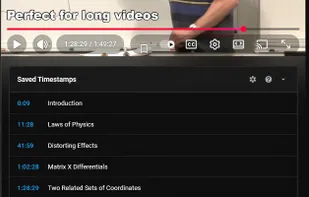
Perfect for students marking lecture sections, researchers cataloguing interviews, music fans saving song timestamps in long mixes, or anyone who revisits specific moments in videos.
Features:
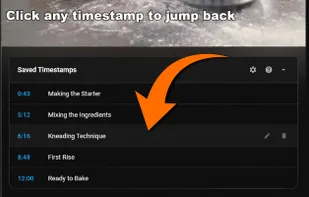
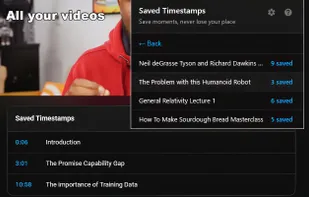
Save timestamps with one click or keyboard shortcut (Alt+S) Add notes to remember why you saved each moment Timestamps panel below every video shows your bookmarks Click any timestamp to jump directly to that moment Chrome sync support - timestamps sync across your browsers Works locally - no account required
Free tier includes all core features. Available for Chrome and Firefox.