



Tuneful
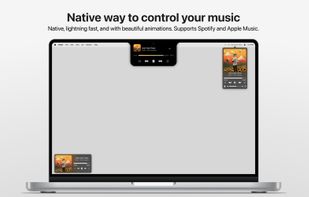
Tuneful lets you control Spotify or Apple Music effortlessly on your Mac, designed from the ground up to feel like a native part of macOS—from UI and animations to performance. Running in the background, Tuneful uses minimal system resources.

Features
Properties
- Support for Themes
- Lightweight
- Customizable
Features
- Dark Mode
- Ad-free
- No registration required
- No Tracking
- Sits in the MenuBar
- Support for Keyboard Shortcuts
 Apple Music integration
 Spotify integration
Tags
- media-controls
- notch
- media-control
- Apple Music
- media-controller
- Spotify Controller
- Spotify
Tuneful News & Activities
Recent News
Recent activities
 Maoholguin added Tuneful as alternative to Droppy for macOS
 Casx1 added Tuneful as alternative to DynamicHorizon
 Maoholguin added Tuneful as alternative to QuakeNotch
 POX added Tuneful as alternative to ComfyNotch
- pastel_p1xel_punK added Support for Themes as a feature to Tuneful


Tuneful information
Developed by
Martin FeketeLicensing
Proprietary and Commercial product.Pricing
One time purchase (perpetual license) that costs $4.Alternatives
33 alternatives listedSupported Languages
- English


What is Tuneful?
Tuneful lets you control Spotify or Apple Music effortlessly on your Mac, designed from the ground up to feel like a native part of macOS—from UI and animations to performance. Running in the background, Tuneful uses minimal system resources.
Three Ways to Control Your Music:
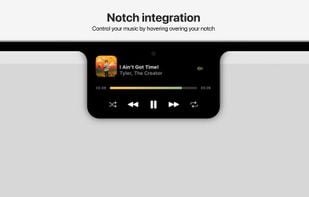
• Notch Integration Simply hover over the notch to reveal the music player with satisfying haptic feedback. Customize its behavior to match your preferences.
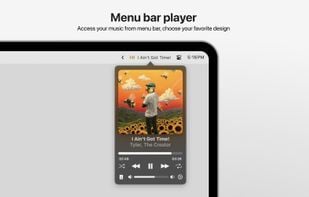
• Menu Bar Player Click the song name in the menu bar to open a sleek popover window for quick playback control. Choose from three distinct styles to personalize its appearance.
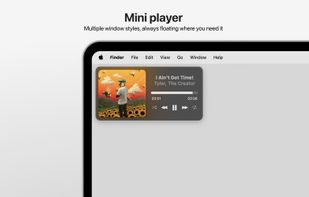
• Mini Player Window Pick from multiple mini player designs to keep your music controls within reach, wherever you are.
Fine-tune every detail - from the information displayed in the menu bar to the look of the mini player, popover, keyboard shortcuts, and more - to make Tuneful truly yours.
