



uKick
All-in-one extension to block, boost, and tweak everything on Kick for a better streaming experience.

Cost / License
- Free
- Open Source (Apache-2.0)
Platforms
- Microsoft Edge
- Google Chrome
- Violentmonkey
- Mozilla Firefox
- Tampermonkey

Features
- Filtering
- Content Filtering
- Microsoft Edge extension
Tags
- content-filter
- userscript
- kick-com
- Google Chrome Extension
- tampermonkey
- user-blocking
- violentmonkey
- user-blocked
- kick
- Firefox Extension
uKick News & Activities
Recent activities
- berkaygediz updated uKick
- berkaygediz updated uKick
- berkaygediz liked uKick
- berkaygediz added uKick
 berkaygediz added uKick as alternative to Unwanted Twitch, Content Farm Terminator, aktroll blocker and YTBlock
uKick information
Developed by
 berkaygediz
 Licensing
Open Source (Apache-2.0) and Free product.Written in
Alternatives
6 alternatives listedSupported Languages
- English
- Turkish
- German
- Spanish
- Polish
- Portuguese
- Arabic
- Chinese
- Japanese
- Korean

AlternativeTo Category
Web BrowsersGitHub repository
- 3 Stars
- 0 Forks
- 0 Open Issues
- Updated


What is uKick?
All-in-one extension to block, boost, and tweak everything on Kick for a better streaming experience.
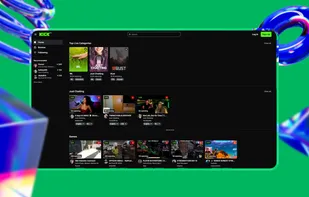
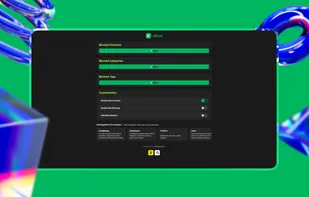
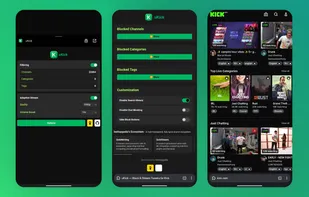
Take full control of your Kick experience with uKick — a Chrome extension that lets you block unwanted content and tweak your streams for a cleaner and more customizable viewing experience.
With uKick, you can hide Kick channels, categories, and tags, filter toxic chat messages, and enhance streams with adaptive quality control and volume boosting. All changes apply instantly, giving you full control over your homepage, sidebar, live chat, and video player.
Features: 📱 Mobile Support — Use uKick on all Chromium-based browsers. A one-time, dismissible promo section appears in the popup showcasing berkaygediz's open-source ecosystem projects. 🛑 Block Channels, Categories & Tags — instantly hide streams and content you don't want to see 💬 Filter Chat Users — automatically remove messages from blocked users in Kick chat ?? Quick Block Buttons — add one-click block next to usernames and stream cards ? Real-Time Updates — changes are applied instantly across Kick 🧰 Manage Your Lists — import, export, view, or clear your block lists anytime 🎥 Adaptive Stream Quality — set your preferred resolution (160p --> 4K) and let uKick auto-adjust quality 🔊 Volume Boost (1x --> 10x) — go beyond Kick's default volume limit for a better audio experience 📋 Search History Control — option to disable search history tracking ?? Customizable Interface — toggle chat filtering and block buttons on/off as needed 🔒 Privacy Friendly — runs only on Kick 🚫 No tracking 🚫 No external connections ? 100% open-source - https://github.com/berkaygediz/uKick
Note: The extension includes a non-intrusive ecosystem showcase section in the options page and popup that displays other open-source projects by berkaygediz. This section is clearly visible to users and contains no hidden functionality.
Disclaimer: This extension is not affiliated with or endorsed by Kick.com.