

Urik Keyboard
Privacy-focused Android keyboard with swipe typing, custom layouts, and password manager support. No tracking, 100% on-device, and fully open source.




Features
Properties
- Lightweight
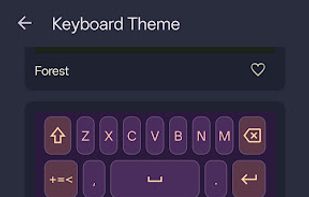
- Support for Themes
- Privacy focused
Features
- No registration required
- Ad-free
- Works Offline
- Dark Mode
- No Tracking
- Support for i18n
- Swipe Typing
Tags
- kotlin
- Android
Urik Keyboard News & Activities
Recent activities
- urikdev updated Urik Keyboard
- OrdinaryPerson added Urik Keyboard as alternative to CleverKeys Keyboard
- urikdev updated Urik Keyboard
- urikdev added Dark Mode as a feature to Urik Keyboard
- urikdev updated Urik Keyboard
- niksavc liked Urik Keyboard
- urikdev added Mobile Keyboard as a feature to Urik Keyboard
- urikdev rated Urik Keyboard
- urikdev liked Urik Keyboard
- urikdev added Urik Keyboard
Urik Keyboard information
Developed by
urikdevLicensing
Open Source (GPL-3.0) and Free product.Alternatives
9 alternatives listedSupported Languages
- English
- Czech
- German
- Spanish
- Portuguese
- Swedish
- Polish
- Russian
- Ukrainian
AlternativeTo Categories
Office & Productivity, OS & UtilitiesGitHub repository
- 191 Stars
- 17 Forks
- 4 Open Issues
- Updated


What is Urik Keyboard?
Input
Swipe typing with geometric path matching One-handed and split modes Long-press for character variations and custom key mapping Spacebar swipe for cursor control QWERTZ, AZERTY, Dvorak, Colemak, and Workman layouts Hardware keyboard detection
Intelligence
On-device spell checking using SymSpell algorithm Smart autocorrect for URLs, emails, and punctuation context Word learning with encrypted SQLCipher database Multilingual support with dedicated language toggle button Emoji search with keyword support
Integration
Inline autofill support for password managers (Android 11+) Clipboard history with encrypted storage Material You dynamic theming (Android 12+)
Customization
Custom long-press symbol and key assignments Haptic feedback strength slider Auto-capitalization toggle Configurable key sizes and typing behavior WCAG AA contrast and TalkBack support
Privacy
No telemetry, analytics, or network permissions Local on-device processing Encrypted local storage for user data Dictionary export and import for backup or migration