


Curio
25 likes
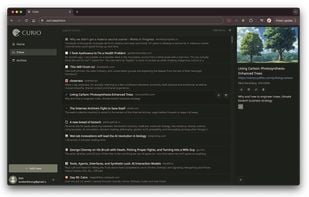
Capture web links and newsletters, organize articles with tags, notes, and highlights, search a personal library, and read clean text online or offline in a focused Markdown viewer. Planned features include AI summaries, PDF extraction, and mobile apps.

Cost / License
- Free
- Open Source (GPL-2.0)
Application types
Platforms
- Online
- Self-Hosted
- Google Chrome
- Docker
- Mozilla Firefox


Features
Properties
- Distraction-free
Features
- Dark Mode
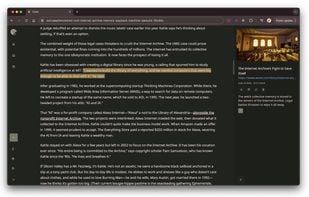
- Highlighter
- Ad-free
- Tagging
- Cloud Sync
- Works Offline
- Web Clipper
- Full-Text Search
- Support for MarkDown
- Save web page for offline use
- Tag based
Tags
- save-links
- Firefox Extension
- Google Chrome Extension
Curio News & Activities
Highlights All activities
Recent News
No news, maybe you know any news worth sharing?
Share a News TipRecent activities
- diegozpy liked Curio
 POX added Curio as alternative to Save It Later
- theromansufi liked Curio
- thejfex liked Curio
 aeksto added Curio as alternative to LinkHub Link Manager



Curio information
Developed by
 Kimberli Zhong
 Licensing
Open Source (GPL-2.0) and Free product.Written in
Alternatives
65 alternatives listedSupported Languages
- English

AlternativeTo Categories
Web Browsers, News & BooksGitHub repository
- 78 Stars
- 3 Forks
- 3 Open Issues
- Updated



No comments or reviews, maybe you want to be first?
What is Curio?
Feed your curiosity. Save your articles now and read them later.
- Collect: Capture content that matters, all in one place. Save any link from the internet, and send email newsletters straight to your Curio inbox.
- Organize: Your ideas, beautifully organized. Tag, favorite, highlight, and add notes to build your personal library of insights.
- Focus: Read on your terms, free from distractions. Dive into articles in a clean, streamlined Markdown viewer that works online and offline.
Available today:
- Save any link via browser extension
- Extract text content for a focused reading experience
- Add notes, highlights, and labels to your items
- Send email newsletters to your Curio inbox
- Search over your entire article library
Coming soon:
- Skim AI-powered summaries and memorable quotes
- Android & iOS apps with offline reading support
- PDF content extraction
- Additional integrations and webhooks