



DbGate
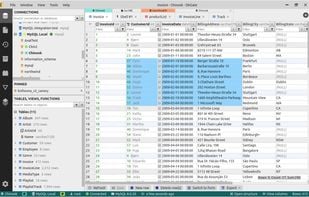
DbGate is cross-platform database manager. Simple and effective, allowing to work with many various databases simultaneously - SQL and NoSQL.
Cost / License
- Freemium (Subscription)
- Open Source (GPL-3.0)
Application type
Platforms
- Mac
- Windows
- Linux
- Online
- Flathub
- Flatpak

Features
Properties
- Lightweight
Features
- Database Management Tool
- Ad-free
- Relational Database
- MongoDB
- Autocompletion
- Support for MS SQL Server
- ER Diagrams
 Support for MariaDB
- SQLite
- NoSQL database
- Visual Query Builder
- Dark Mode
- Works Offline
- Import CSV Data
- Extensible by Plugins/Extensions
Tags
- SQL
- Microsoft SQL Server
- NoSQL
- MySQL
- Postgres SQL
- amazon-redshift
DbGate News & Activities
Recent News
Recent activities
 POX added DbGate as alternative to PostgresGUI
- nic-ilinov reviewed DbGate
DbGate offers a very convenient way to inspect an individual record directly from a table. It presents the row as an object, which makes understanding the data structure much easier.
The only improvement I would suggest is better handling of long text fields in the modal viewer, as it currently lacks automatic line wrapping. Still, many database clients do not provide this type of modal view at all, and DbGate’s implementation makes reviewing JSON particularly comfortable.
- MatthewDev reviewed DbGate
I asked for "best database management (with many database type support, including legacy OracleDB) as a docker container" to gemini, DbGate is recommended on the first list.
A quick docker compose later... looks like I'm going all in with DbGate, it even supports legacy like Cassandra, MSSQL, Redis, and more!
- MatthewDev liked DbGate
 POX added DbGate as alternative to SQL Studio
- PiKiMike reviewed DbGate
I use DbGate mainly for working with relational databases in daily development tasks. What I really like is the clean and intuitive interface – everything feels well organized and easy to understand, even when working with larger schemas.
Searching for tables and navigating through the database is very smooth and saves a lot of time. The foreign key handling is especially useful, as it allows me to quickly jump between related tables, which significantly improves my workflow.
Overall, DbGate...
- duongcao47 reviewed DbGate
I’ve been using DBGate as a lightweight alternative after using DBeaver for a while, and it’s been great so far. The interface is clean and easy to navigate, setup is quick, and it runs smoothly on my Mac. It has everything I need for everyday work like running queries, browsing tables, and managing schemas without feeling bloated. Solid free option if you want something simple and fast.
- egoan82 reviewed DbGate
DbGate has proven to be an excellent tool for my work as a backend developer. Its clean and modern interface, available for Windows, macOS, Linux, and even a web browser, allows me to connect seamlessly to databases like PostgreSQL, MySQL, and Redis from a single location.
The SQL editor with autocomplete, query history, and integrated console makes writing and executing queries quick and easy.
Furthermore, the visual table navigation, direct data editing, and easy import/export capabilities...
- david-jauk reviewed DbGate
I’ve been using DbGate as a general SQL/NoSQL client and I’m really happy with it. It connects easily to multiple databases (PostgreSQL, MySQL, SQL Server, SQLite, MongoDB, etc.) and the interface is much cleaner than a lot of older tools. I especially like the data grid, quick filtering, and the built-in query editor.
For an open-source tool with a very generous free Community edition, it feels surprisingly polished. Premium adds some genuinely useful extras like backup/restore, advanced...


What is DbGate?
Open source database manager for SQL Server, MySQL, PostgreSQL, SQLite, MongoDB and more.
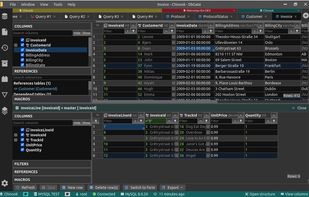
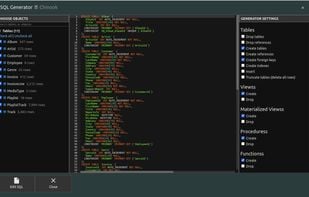
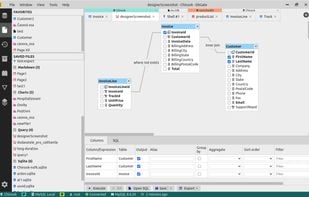
It's designed to be simple to use and effective, when working with more databases simultaneously. But there are also many advanced features like schema compare, visual query designer, chart visualisation or batch export and import.
DbGate is licensed under MIT license and is completely free.
Supported databases:
- MySQL
- PostgreSQL
- SQL Server
- MongoDB
- SQLite
- Amazon Redshift
- CockroachDB
- MariaDB
Freemium: https://dbgate.io/pricing
DbGate information
Developed by
UnknownLicensing
Open Source (GPL-3.0) and Freemium product.Pricing
Subscription ranging between $12 and $15 per month + free version with limited functionality.Written in
Rating
Average rating of 4.9Alternatives
168 alternatives listedSupported Languages
- English

AlternativeTo Category
DevelopmentGitHub repository
- 6,691 Stars
- 403 Forks
- 445 Open Issues
- Updated



Comments and Reviews
Support multiple RDBMS and NoSQL, Visual Query Designer, Extensions/Plugins support
I asked for "best database management (with many database type support, including legacy OracleDB) as a docker container" to gemini, DbGate is recommended on the first list.
A quick docker compose later... looks like I'm going all in with DbGate, it even supports legacy like Cassandra, MSSQL, Redis, and more!
DbGate offers a very convenient way to inspect an individual record directly from a table. It presents the row as an object, which makes understanding the data structure much easier.
The only improvement I would suggest is better handling of long text fields in the modal viewer, as it currently lacks automatic line wrapping. Still, many database clients do not provide this type of modal view at all, and DbGate’s implementation makes reviewing JSON particularly comfortable.
I use DbGate mainly for working with relational databases in daily development tasks. What I really like is the clean and intuitive interface – everything feels well organized and easy to understand, even when working with larger schemas.
Searching for tables and navigating through the database is very smooth and saves a lot of time. The foreign key handling is especially useful, as it allows me to quickly jump between related tables, which significantly improves my workflow.
Overall, DbGate feels lightweight but powerful. There’s still room for small UX improvements, but as a database client it’s already very efficient and pleasant to use. I’d definitely recommend it to developers who value clarity and productivity.
I’ve been using DBGate as a lightweight alternative after using DBeaver for a while, and it’s been great so far. The interface is clean and easy to navigate, setup is quick, and it runs smoothly on my Mac. It has everything I need for everyday work like running queries, browsing tables, and managing schemas without feeling bloated. Solid free option if you want something simple and fast.
I’ve been using DbGate as a general SQL/NoSQL client and I’m really happy with it. It connects easily to multiple databases (PostgreSQL, MySQL, SQL Server, SQLite, MongoDB, etc.) and the interface is much cleaner than a lot of older tools. I especially like the data grid, quick filtering, and the built-in query editor.
For an open-source tool with a very generous free Community edition, it feels surprisingly polished. Premium adds some genuinely useful extras like backup/restore, advanced import/export and data compare, so it’s a strong option if you work with databases daily.
DbGate has proven to be an excellent tool for my work as a backend developer. Its clean and modern interface, available for Windows, macOS, Linux, and even a web browser, allows me to connect seamlessly to databases like PostgreSQL, MySQL, and Redis from a single location.
The SQL editor with autocomplete, query history, and integrated console makes writing and executing queries quick and easy.
Furthermore, the visual table navigation, direct data editing, and easy import/export capabilities (CSV, JSON, etc.) streamline common development and maintenance tasks.
Thanks to its versatility (SQL + NoSQL), stability, and intuitive use, DbGate simplifies my daily workflow and eliminates the need for multiple tools. In short: a practical, powerful, and reliable solution that I wholeheartedly recommend.