





Desktop Space Renamer
Like
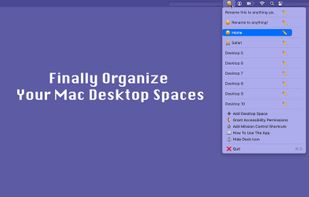
A lightweight macOS menu bar app that lets you assign custom names and emoji labels to your Desktop Spaces, so you can instantly recognize each workspace at a glance, and switch instantly into that workspace.

Cost / License
- Pay once
- Proprietary
Application type
Platforms
- Mac

Features
Desktop Space Renamer News & Activities
Highlights All activities
Recent activities
 PixelSolution added Desktop Space Renamer as alternative to DesktopTitle
 POX added Desktop Space Renamer as alternative to Spaces Renamer, SpaceJump, StayHere and AirSpace
- POX added Desktop Space Renamer


Desktop Space Renamer information
Developed by
Curiosity CodexLicensing
Proprietary and Commercial product.Pricing
One time purchase (perpetual license) that costs $5.Alternatives
5 alternatives listedBadge
Get an embeddable badge for Desktop Space RenamerSupported Languages
AlternativeTo Category
Office & Productivity

No comments or reviews, maybe you want to be first?
