



Enhanced GitHub
2 likes
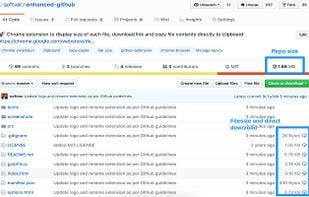
Chrome extension to display size of each file, download link and copy file contents directly to clipboard to GitHub repos.
Cost / License
- Free
- Open Source (MIT)
Platforms
- Online
- Google Chrome


Features
 GitHub Integration
Enhanced GitHub News & Activities
Highlights All activities
Recent activities
No activities found.
Enhanced GitHub information
Developed by
Varun MalhotraLicensing
Open Source (MIT) and Free product.Written in
Alternatives
9 alternatives listedSupported Languages
- English

AlternativeTo Category
Web BrowsersGitHub repository
- 2,291 Stars
- 201 Forks
- 62 Open Issues
- Updated



No comments or reviews, maybe you want to be first?
What is Enhanced GitHub?
Display repo size, size of each file, download link and option to copy file contents
Extension that provides useful features on top of GitHub website. Features
- Displays repo size.
- Displays each file size in every active branch (not applicable for folder / symlink)
- Show download link for each individual file (not applicable for folder / symlink)
- Copy file's contents directly to Clipboard (just won't work for markdown files)
- Download file while viewing it's contents.
- Coming soon...please suggest by opening an issue on https://github.com/softvar/enhanced-github/issues
Note: From v1.0.0 onwards - Click on download icon/button while pressing Alt / Cmd(for Mac)/ Ctrl(for Windows) because GitHub has stopped downloading of files directly.
It's open-sourced - https://github.com/softvar/enhanced-github under MIT License
For more updates, please stay tuned!