Enhanced GitHub icon

Enhanced GitHub

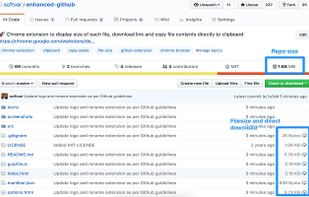
Chrome extension to display size of each file, download link and copy file contents directly to clipboard to GitHub repos.
Enhanced GitHub screenshot 1

Cost / License

  • Free
  • Open Source (MIT)

Platforms

  • Online
  • Google Chrome
2likes
0articles

Features

  1. GitHub icon  GitHub Integration

Enhanced GitHub News & Activities

Highlights All activities

Recent activities

No activities found.

Enhanced GitHub information

AlternativeTo Category

Web Browsers

GitHub repository

  •  2,385 Stars
  •  205 Forks
  •  66 Open Issues
  •   Updated  
View on GitHub
Enhanced GitHub was added to AlternativeTo by Paul on and this page was last updated .
No comments or reviews, maybe you want to be first?

Official Links

What is Enhanced GitHub?

Display repo size, size of each file, download link and option to copy file contents

Extension that provides useful features on top of GitHub website. Features

  1. Displays repo size.
  2. Displays each file size in every active branch (not applicable for folder / symlink)
  3. Show download link for each individual file (not applicable for folder / symlink)
  4. Copy file's contents directly to Clipboard (just won't work for markdown files)
  5. Download file while viewing it's contents.
  6. Coming soon...please suggest by opening an issue on https://github.com/softvar/enhanced-github/issues

Note: From v1.0.0 onwards - Click on download icon/button while pressing Alt / Cmd(for Mac)/ Ctrl(for Windows) because GitHub has stopped downloading of files directly.

It's open-sourced - https://github.com/softvar/enhanced-github under MIT License

For more updates, please stay tuned!