



LightPDF
Cloud PDF toolkit provides over 20 tools for editing, conversion, OCR, merge, split, annotation, batch processing, and signatures, with free online access, cross-platform usability, no watermarks, no size limits, and options for mobile and desktop integration.

Cost / License
- Freemium (Subscription)
- Proprietary
Application types
Platforms
- Online
- Android
- iPhone
- Windows
- Mac

Features
Properties
- Lightweight
Features
- Sign PDF files
- PDF compression
- Fill PDF Forms
- PDF encryption
- OCR
- Combine PDF
- PDF annotation
- Split PDF files
- Built-in PDF converter
- Convert PDF to Excel document
- AI-Powered
- Export to PDF
- PDF to PPT
- Cloud based
- Convert PDF to image
- JPG to PDF Conversion
- Convert PDF to Word document
- Convert Excel to PDF document
Tags
- Convert PDF
- ppt-to-pdf
- pdf-conversion
- signature
- word-to-jpg
- cad-to-pdf
- add-watermarks
- unlock-pdf-file
- comment-pdf
- pdf-to-jpg
- pdf-to-png
- free-pdf-editor
- pdf-tool
LightPDF News & Activities
Recent News
Recent activities
- Danilo_Venom updated LightPDF
 SwiftPDFLab added LightPDF as alternative to SwiftPDFLab
 dev7732 added LightPDF as alternative to GeeksPrep Tools
 Dillip-Munda added LightPDF as alternative to Export PDF to EXCEL
 pdfselfhelper added LightPDF as alternative to PDF Self-Helper
 Ilyas-Khan added LightPDF as alternative to QuickerConvert





Featured in Lists

A list with 809 apps by AmileyaRyver without a description.
What is LightPDF?
LightPDF is a PDF solution designed for educators, students, office professionals, and others who need a simplified approach to PDFs. It offers services across multiple platforms, including a free web application, paid mobile and desktop applications, and API and SDK solutions for developers.
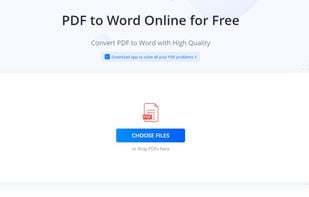
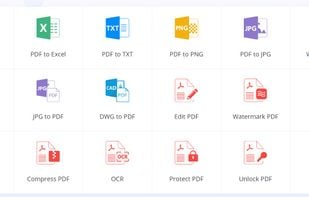
The free web application provides over 20 PDF tools without restrictions on file size or usage duration. Users can convert PDFs to Office files and images, merge, compress, perform OCR, split, rotate, sign, and edit PDF files. It is accessible through any browser on any device.
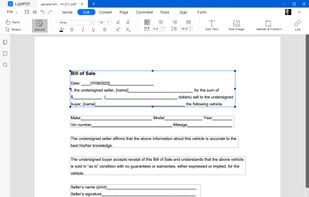
The desktop application is an advanced PDF editor with features for editing, reading, converting, and commenting on PDFs. It supports creating and editing fillable PDF forms, batch conversions, OCR, document splitting, and more. Key features include modifying PDF texts, images, and links, converting PDFs to other formats, OCR for scanned PDFs, PDF compression and merging, e-signature insertions, PDF annotation and commenting, search and replace functions, watermark additions and removals, header and footer modifications, document sharing via links, and cloud-based document uploads.
LightPDF also offers mobile applications for Android and iOS for on-the-go PDF conversion, merging, OCR, and editing. The mobile app includes a scan PDF function, which lets users scan physical documents with their phone camera and convert them into PDFs.


LightPDF information
Developed by
 Apowersoft
 Licensing
Proprietary and Freemium product.Pricing
Subscription ranging between $3 and $20 per month + free version with limited functionality.Rating
Average rating of 4.6Alternatives
170 alternatives listedSupported Languages
- English
- Arabic
- Chinese
- Japanese
- French
- German
- Spanish
- Portuguese
- Italian
- Dutch
- Czech
- Hungarian
- Swedish
- Finnish
- Greek
- Danish
- Turkish
- Norwegian
- Polish


Comments and Reviews
It's easy to use. I can use it to edit PDF files for my paper.
I didn't expect this small software to have quite a wide range of functions.
I think it is better than smallpdf, it doesn't need any fee to convert all my files. don't need to wait an hour for more and no need to download desktop app. nice job
I really like its converting and editing features. I will definitely use this regularly.
Aha!I am so glad to use this tool,It can help me save lots of time.
quite useful to me when editing or converting pdf files.
totally free and does not have file size or time limits in using.