

Open 100x icon
Open 100x icon

Open 100x

Open 100x is an Android camera app built to give more phones access to extreme 100x zoom-style shooting, even when the stock camera app does not expose that kind of range.

Cost / License

  • Free
  • Open Source (MIT)

Application type

Platforms

  • Android
  • Android Tablet
0likes
0comments
0articles

Features

Properties

  1.  Privacy focused
  2.  No AI

Features

  1.  No Tracking
  2.  Works Offline
  3.  Ad-free
  4.  No registration required

Open 100x News & Activities

Highlights All activities

Recent activities

Open 100x information

  • Developed by

    GB flagKenneth Cho
  • Licensing

    Open Source (MIT) and Free product.
  • Alternatives

    41 alternatives listed
  • Supported Languages

    • English

AlternativeTo Categories

OS & UtilitiesPhotos & Graphics

GitHub repository

  •  18 Stars
  •  2 Forks
  •  4 Open Issues
  •   Updated  
View on GitHub
Open 100x was added to AlternativeTo by Paul on and this page was last updated .
No comments or reviews, maybe you want to be first?

What is Open 100x?

Open 100x is an Android camera app built to give more phones access to extreme 100x zoom-style shooting, even when the stock camera app does not expose that kind of range.
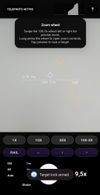
The goal is not just to add a bigger zoom slider. Open 100x is meant to be an open extreme-zoom tool with local image enhancement, pro-style controls, stability feedback, and traditional image processing designed specifically for the messy reality of long-range mobile zoom.

What it does:

  • Unlocks up to 100x zoom through native camera zoom plus digital crop.
  • Adds controls and feedback designed for high zoom, including stability status, histogram tools, grid modes, zoom presets, flashlight support, and crop nudging.
  • Includes local post-processing for extreme zoom captures.
  • Uses traditional, non-AI image processing only.
  • Runs fully on-device with no cloud processing and no external APIs.

Local upscaling and denoising:

Open 100x includes a local post-processing path for zoomed images. The purpose is to push open, traditional image-processing techniques that can make extreme phone zoom more usable.

The enhancement pipeline may include:

  • Denoising
  • Smoothing
  • Sharpening
  • Contrast and detail recovery
  • Local upscaling suitable for high-zoom crops

These algorithms are implemented locally in the app and are designed to improve noisy, soft, high-magnification phone images without AI/ML inference.
