


Key'n'Stroke
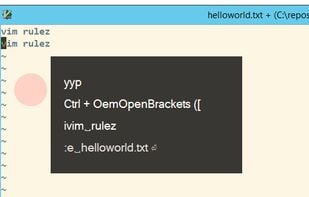
Key'n'Stroke (previously named PxKeystrokesForScreencasts) displays keystrokes and mouse clicks in an overlay window.

Features
Properties
- Lightweight
- Customizable
Features
- Mouse Highlighting
- Keylogger
- Keystroke Visualization
- Customizable shortcuts
Tags
- mouse-spotlight
Key'n'Stroke News & Activities
Recent News
Recent activities
 POX added Key'n'Stroke as alternative to FocusCursor
- chuck3252 reviewed Key'n'Stroke
Great little utility for showing mouse button clicks when demonstrating software.
What is Key'n'Stroke ?
Key'n'Stroke displays keystrokes in an overlay window. (Windows 8+)
Press Ctrl + Shift + Alt to reveal configuration options, resize, move or close the window.
Features
Displays special keys (e.g. volume up: 🔊) and shortcuts Visually indicate mouse cursor position Visually indicate pressed buttons Click Through Opacity Customizable: Icons, Colors, Font, Size and Position, Text Position and Orientation Displays history of pressed keys Icon in notification area One small file, no installation required Works with high-dpi screens Works with multi-dpi screen setups
Key'n'Stroke Videos
Key'n'Stroke information
Developed by
PhaiaxLicensing
Open Source (Apache-2.0) and Free product.Written in
Rating
Average rating of 4.8Alternatives
14 alternatives listedSupported Languages
- English


Comments and Reviews
Free and super lightweight. Visually smooth (no overlay lag). Hoping for some more customizations later on. Such as the ability to show everything (clicks and keys) in the same window and possibly also everything by the cursor (disabling the window).
Great little utility for showing mouse button clicks when demonstrating software.
This is the only app on Windows that works perfectly for me. Carnac has bugs supporting multiple monitor and has stopped maintaining for years. KeycastOW has observable lagging in showing mouse click ripples in open-source version, and the latest version is not free. Other alternatives has ugly UI.
Great FLOSS software that does what it says it does very well. Used it for some game debugging and figured out my problem immediately!
The only really free SW I found so far for visualizing mouse clicking and showing pressed keys on keyboard at the same time, which I was needed for my presentation videos :)