


Key'n'Stroke
15 likes
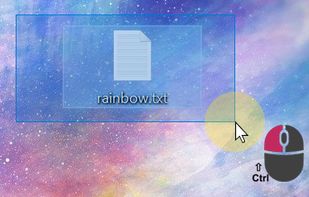
Displays keystrokes, mouse clicks, cursor position, shortcuts, and special keys in a fully customizable overlay. Offers click-through mode, opacity, resizable window, history of pressed keys, high-dpi and multi-dpi screen support, and notification area icon.

Platforms
- Windows


Discontinued
The project seems no longer developed. Last version, 1.1.0, released in February 2022), can be still downloaded from Github

Features
Key'n'Stroke News & Activities
Highlights All activities
Recent News
No news, maybe you know any news worth sharing?
Share a News TipRecent activities
 SrkiMouseKit added Key'n'Stroke as alternative to MouseKit
 POX added Key'n'Stroke as alternative to KeyStruck
- Danilo_Venom updated Key'n'Stroke
 mashyo added Key'n'Stroke as alternative to SHARA


What is Key'n'Stroke ?
Key'n'Stroke Videos
Key'n'Stroke information
Developed by
PhaiaxLicensing
Open Source (Apache-2.0) and Free product.Written in
Rating
Average rating of 4.7Alternatives
17 alternatives listedBadge
Get an embeddable badge for Key'n'StrokeSupported Languages

AlternativeTo Category
OS & UtilitiesGitHub repository
- 546 Stars
- 62 Forks
- 58 Open Issues
- Updated


Comments and Reviews
Free and super lightweight. Visually smooth (no overlay lag). Hoping for some more customizations later on. Such as the ability to show everything (clicks and keys) in the same window and possibly also everything by the cursor (disabling the window).
Great little utility for showing mouse button clicks when demonstrating software.
This is the only app on Windows that works perfectly for me. Carnac has bugs supporting multiple monitor and has stopped maintaining for years. KeycastOW has observable lagging in showing mouse click ripples in open-source version, and the latest version is not free. Other alternatives has ugly UI.
Great FLOSS software that does what it says it does very well. Used it for some game debugging and figured out my problem immediately!
The only really free SW I found so far for visualizing mouse clicking and showing pressed keys on keyboard at the same time, which I was needed for my presentation videos :)