
MouseKit icon
MouseKit icon

MouseKit

MouseKit turns your mouse cursor into a presentation, on-screen drawing, and cursor-tracking tool — all in one, for Windows.
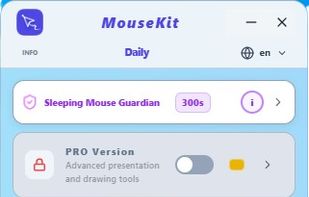
Free Standard panel - close
Guardian / Indicator / Pulsing / Colored Cursor / Mouse Trail

Cost / License

  • Freemium (Pay once)
  • Proprietary

Application type

Platforms

  • Windows  The installer isn't code-signed yet, so Windows may show a SmartScreen warning during install — click "More info" then "Run anyway
0likes
0articles

Features

Properties

  1.  Lightweight

Features

  1.  No registration required
  2.  Ad-free
  3.  Dark Mode
  4.  Works Offline
  5.  Keystroke
  6.  Spotlight
  7.  Timer

MouseKit News & Activities

Highlights All activities

Recent activities

MouseKit information

  • Developed by

    RS flagPAKOM Digital
  • Licensing

    Proprietary and Freemium product.
  • Pricing

    One time purchase (perpetual license) ranging between $10 and $18 + free version with limited functionality.
  • Alternatives

    25 alternatives listed
  • Badge

    Get an embeddable badge for MouseKit
  • Supported Languages

    • English
    • Serbian
    • Russian
    • Spanish
    • German
    • French
    • Italian
    • Portuguese
    • Chinese
    • Hindi
    • Arabic
    • Japanese
    • Korean
    • Turkish
    • Polish

AlternativeTo Categories

Office & ProductivityPhotos & Graphics

Popular alternatives

View all
MouseKit was added to AlternativeTo by Srdjan Pavlovic on and this page was last updated .
No comments or reviews, maybe you want to be first?

Official Links

What is MouseKit?

MouseKit is a presentation tool that enhances your mouse cursor.

It features a motion trail, cursor highlight, on-screen drawing, countdown timer, and a "guardian" to prevent misclicks. It's ideal for teachers, trainers, and presenters.

The Free Standard option includes cursor trail and highlight, Standard Plus adds annotation shapes, screenshots, and a spotlight tool, while PRO offers full presentation and drawing mode, click highlights, a timer, keystroke display, and a magnifier.

MouseKit replaces multiple specialized apps and allows you to switch profiles for different tasks with one click. It is available in 15 languages.

MouseKit Videos

Show 2 more videos
