



Toucan
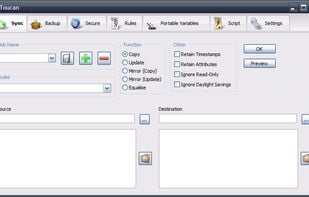
Toucan is a small portableapp utility allowing you to synchronise, backup and secure your data with more options than the built in suite utilities. It is split up into 7 tabs, allowing you to easily find the function that you want.
Cost / License
- Free
- Open Source (GPL-2.0)
Application types
Alerts
- Discontinued
Platforms
- Windows
- PortableApps.com
Toucan is not being actively developed or maintained. That means that new features are unlikely to appear and bug submissions will generally not be reviewed unless a pull request with a fix is offered by the community.

Features
- Encrypted Backup
- Incremental Backup
- AES-256 Encryption
- Portable
- Command line interface
- File Sync
- Multiple languages
- Folder Sync
Tags
- Backup and Restore
- File Backup
- mirroring
Toucan News & Activities
Recent News
Recent activities
- anselmus updated Toucan
- TBayAreaPat reviewed Toucan
Toucan crashed when I tried to do a drive-to-drive comparison, and it can't be trusted with complex folders like \Program Files. FreeFileSync is much more trustworthy.
- rgnos liked Toucan
 SoftTest added Toucan as alternative to Mirror Synchronise
- namdx1987 liked Toucan



What is Toucan?
Toucan is a small portableapp utility allowing you to synchronise, backup and secure your data with more options than the built in suite utilities. It is split up into 7 tabs, allowing you to easily find the function that you want.
Features:
- Five synchronisation modes, Copy, Mirror, Equalise, Move and Clean. These can be combined with a variety of file checks such as File Size, Modified Time and a File Header Check to minimise the amount of copying needed.
- Backup and restore in industry standard zip and 7-zip files, with support for complete backups, updating existing backups and incremental backups, as well as restoring files from an archive.
- AES-256 encryption using ccrypt
- Command line support, translations to many languages.
- No VSS-Support
- A complete command line system allowing you to create new jobs and run existing ones from the command prompt or a batch file.
- A Rules system that allows you to easily exclude files based on their name, a regular expression, their modified date or file size.
- An advanced scripting system using the Lua programming language that allows complex scripts to be created, anything from a backup script that automatically uploads new backups to a script that synchronizes your files to a USB drive and then encrypts the sensitive files in case of loss.
- A large collect of in built Variables for basic functions such as the date and time or more complex variables that point to the drives label or documents directory. You can also define your own as short cuts to paths on your USB drive or your PC.
Toucan information
Developed by
Steve LamertonLicensing
Open Source (GPL-2.0) and Free product.Written in
Rating
Average rating of 2.2Alternatives
61 alternatives listedSupported Languages
- English

AlternativeTo Categories
Backup & Sync, OS & Utilities, Security & PrivacyGitHub repository
- 135 Stars
- 23 Forks
- 21 Open Issues
- Updated


Comments and Reviews
You have to go folder by folder to see all the changes in the Preview option. So if you have 100 folders, you won't see all the changes at once before running the Sync, until you open all the folders/subfolders. That makes it unusable to me because I always want to see the changes before proceeding, so does Freefilesync.
Toucan crashed when I tried to do a drive-to-drive comparison, and it can't be trusted with complex folders like \Program Files. FreeFileSync is much more trustworthy.
A good application, but with hundreds of thousands of files on Windows x64 with 32 GB of RAM, it crashes without error messages.
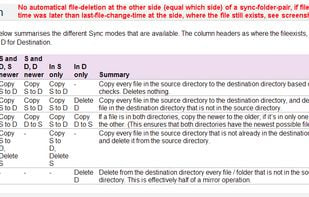
Toucan has no automatical symmetrical file-deletion
No automatical file-deletion at the other side (equal which side) of a sync-folder-pair, if file-deletion-time was later than last-file-change-time at the side, where the file still exists, see screenshot. Sync-Apps with symmetrical auto-file-deletion are: Allway Sync, PureSync, Synkron.
Someone said this was an alternative to DirSync Pro, but it doesn't checksum what it writes, which is the only thing I use DirSyncPro for, so this one's useless to me.