

Tusk Backup icon
Tusk Backup icon

Tusk Backup

A Mac backup app for video creators and photographers that tracks where every project file is backed up across drives and cloud, even when drives are unplugged.
Tusk Backup screenshot 1

Cost / License

  • Pay once
  • Proprietary

Platforms

  • Mac
2likes
0comments
0articles

Features

Properties

  1.  Privacy focused

Features

  1.  Cloud Sync
  2.  Ad-free
  3.  File Tagging
  4.  Automatic Backup
  5.  No registration required

Tusk Backup News & Activities

Highlights All activities

Recent activities

  • Tusk_Niklas A comment was removed from Tusk Backup
  • e737271 A comment was removed from Tusk Backup
  • e737271 reviewed Tusk Backup  

    I no longer have to remember (or manually label!) which old hard drives contain which projects and files. tusk gives me a nice overview all in one place, it’s amazing.

  • e737271 liked Tusk Backup
  • Tusk_Niklas liked Tusk Backup
  • Hedge icon
    Tusk_Niklas added Tusk Backup as alternative to Hedge
  • App icon
    Tusk_Niklas added Tusk Backup as alternative to FreeFileSync and Carbon Copy Cloner
  • Tusk_Niklas added Tusk Backup

Tusk Backup information

  • Developed by

    DE flagNiklas Fischer
  • Licensing

    Proprietary and Commercial product.
  • Pricing

    One time purchase (perpetual license) that costs from $79.
  • Alternatives

    4 alternatives listed
  • Supported Languages

    • English
Tusk Backup was added to AlternativeTo by Tusk_Niklas on and this page was last updated .
No comments or reviews, maybe you want to be first?

What is Tusk Backup?

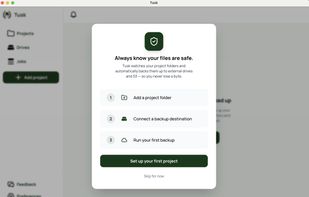
Tusk is a Mac backup app for freelance videographers, photographers, and content creators who run dozens of shoots and projects a year. You do not back up whole drives. You create a project for each job, point it at that project's folder, choose where copies should live, and Tusk takes it from there.

Each project is self-contained: its own folder, its own backup destinations, its own file status. A wedding from March and a client reel from last week are separate projects with separate backup setups, not one giant sync job across everything on your Mac. Tusk watches each project folder continuously and keeps every destination in sync as you work.

That project-level view is what makes Tusk different from disk cloning tools like Carbon Copy Cloner or folder sync tools like ChronoSync. Those tools are built around copying storage volumes. Tusk is built around the way freelancers actually work: one project at a time, often spread across several drives and a cloud bucket, with no single place that holds everything.

Supported destinations: external drives (SSDs, HDDs, SD cards mounted as volumes), Google Drive and S3-compatible storage (AWS S3, Backblaze B2, Wasabi, and similar). Tusk stores files in standard formats on your own drives and cloud accounts. No proprietary containers.

Tusk is a one-time purchase at $79. Includes a 14-day free trial with no credit card and no account required. Mac only. Complements tools like Time Machine and Backblaze rather than replacing them.

Tusk Backup Videos

Official Links

