Apps with 'Clipboard History' feature Page 9 of 9

All apps in Apps with 'Clipboard History' feature category. Use the filters below to narrow down your search. 
Copy a direct link to this comment to your clipboard
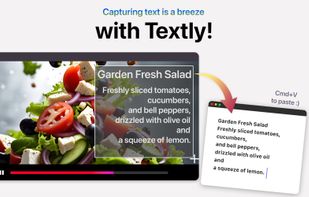
  1. Simplify your workflow with Textly – the ultimate tool for capturing text, copying it, and pasting it wherever you need. Whether you’re working on a project, taking notes, or organizing information, Textly makes text management seamless and efficient.

    Cost / License

    • Freemium
    • Proprietary

    Platforms

    • Mac
    Textly: Capture, Copy & Paste screenshot 1
    Textly: Capture, Copy & Paste screenshot 1
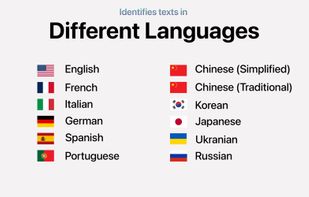
    Textly: Capture, Copy & Paste screenshot 2
    +3
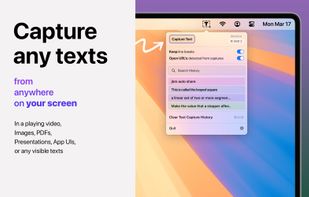
    Textly: Capture, Copy & Paste screenshot 3
    10 alternatives
  2. everclip is a headless, event-driven X11 CLIPBOARD history daemon and pipe-first CLI. It stores stable history records in a Turso database (sqlite3) while keeping each original X11 target payload in a deduplicated blob store.

    Cost / License

    • Free
    • Open Source (MIT)

    Application type

    Platforms

    • Linux
    everclip's here to help!
    Search, show, and copy paste clipboard entries on X11.
    View additional clipboard metadata with the --json flag
    +2
    List clipboard history entries
    51 alternatives
  3. Copychest icon
     Like

    Clipboard manager for Windows with searchable history, reusable saved text, and region screen capture with annotation. Stored locally, no account.

    Cost / License

    • Freemium
    • Proprietary

    Application type

    Platforms

    • Windows
    • GB flagUnited Kingdom
    Saved text in projects and categories, searchable as you type.
    Clipboard history, searchable and pinnable.
    Region capture with annotation: arrow, highlight, blur.
    +3
    The same library in dark mode.
    19 alternatives
  4. ClipboardMenu is a powerful yet lightweight clipboard manager that lives in your Mac's menu bar. Never lose copied content again - access your complete clipboard history and save frequently used items as snippets for instant reuse.

    Cost / License

    • Free
    • Proprietary

    Application type

    Platforms

    • Mac
    • GB flagUnited Kingdom
    ClipboardMenu screenshot 1
    ClipboardMenu screenshot 1
    ClipboardMenu screenshot 2
    +6
    ClipboardMenu screenshot 3
    31 alternatives
  5. Tameo icon
     Like

    A native macOS clipboard manager with full-text history search and on-device image OCR — fully local, free, and open source.

    Cost / License

    • Free
    • Open Source (MIT)

    Application type

    Platforms

    • Mac
    Search: filter history as you type
    History palette: ??V, paste with 1–0
    Image OCR: find text inside images, ? to paste
    5 alternatives
  6. iClipboard is the #1 clipboard manager. Its polished interface and class-leading features set it apart from all others. With the regular copy & paste commands on your computer, you can only paste the very LAST thing you copied.

    Cost / License

    • Paid
    • Proprietary

    Application type

    Alerts

    • Discontinued

    Platforms

    • Mac
    • US flagUnited States
    iClipboard screenshot 1
    iClipboard screenshot 1
    iClipboard screenshot 2
    +6
    iClipboard screenshot 3
    68 alternatives
  7. Wise Toys icon
     Like

    As a set of utilities for greater productivity, Wise Toys has built in a powerful local file search engine and many plugins, covering all aspects of life and learning, provides many conveniences and saves time for Windows users.

    Cost / License

    • Free
    • Proprietary

    Application type

    Platforms

    • Windows
    • CN flagChina
    Wise Toys screenshot 1
    Wise Toys screenshot 1
    Wise Toys screenshot 2
    1 alternatives