
Copychest icon
Copychest icon

Copychest

Clipboard manager for Windows with searchable history, reusable saved text, and region screen capture with annotation. Stored locally, no account.
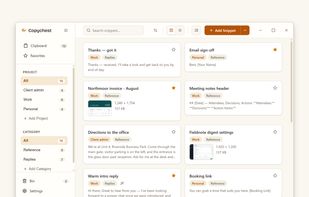
Saved text in projects and categories, searchable as you type.

Cost / License

  • Freemium (Pay once)
  • Proprietary

Application type

Platforms

  • Windows
0likes
0articles

Features

Properties

  1.  Privacy focused

Features

  1.  No Tracking
  2.  Ad-free
  3.  Dark Mode
  4.  Works Offline
  5.  Full-Text Search
  6.  Annotate Screenshot
  7.  No Coding Required
  8.  No registration required
  9.  Text Expansion
  10.  Clipboard monitoring

Copychest News & Activities

Highlights All activities

Recent activities

Copychest information

  • Developed by

    GB flagCopychest
  • Licensing

    Proprietary and Freemium product.
  • Pricing

    One time purchase (perpetual license) that costs $29 + free version with limited functionality.
  • Alternatives

    19 alternatives listed
  • Badge

    Get an embeddable badge for Copychest
  • Supported Languages

    • English

AlternativeTo Categories

Office & ProductivityPhotos & Graphics

Popular alternatives

View all
Copychest was added to AlternativeTo by copychest on and this page was last updated .
No comments or reviews, maybe you want to be first?

What is Copychest?

Copychest is a clipboard manager for Windows. It keeps a searchable history of what you have copied, stores text you paste regularly, and captures regions of the screen you can annotate.

A global shortcut opens a panel over whatever app you are in; picking an item pastes it there. Saved items go into projects and categories, with search across all of them as you type. A saved item can carry placeholder fields, and Copychest prompts for them and gives you the filled text.

Clipboard history is searchable and pinnable. Anything copied from a password manager is excluded from it.

Screen captures are annotated in the app (arrow, highlight, blur) and saved alongside everything else.

Everything is stored locally in your own user profile. No account, no sync, works offline.

The free tier limits projects, saved items and history retention. Pro is $29 one-time: one person, three machines, all 1.x updates.
