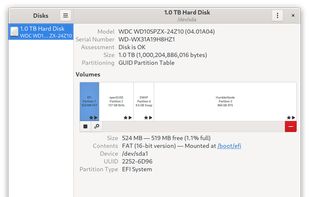
Inspect, format, and partition disks with ease. Monitor health and configure RAID, while providing encryption and seamless integration into Linux systems.
Cost / License
- Free
- Open Source (GPL-2.0)
Application type
Platforms
- Linux
- GNOME

United States

Inspect, format, and partition disks with ease. Monitor health and configure RAID, while providing encryption and seamless integration into Linux systems.

MountMate is a lightweight macOS menu bar utility that lets you mount and unmount external drives with a single click – no Terminal, no Disk Utility, no hassle.


Ejectify automatically unmounts external volumes when your Mac starts sleeping, and mounts them again after it wakes up.


Parallels Toolbox is a collection of essential tools with zero complicated settings.

Eject allows removable media (typically a CD-ROM, floppy disk, tape, or JAZ or ZIP disk) to be ejected under software control. The command can also control some multi-disc CD-ROM changers, the auto-eject feature supported by some devices, and more.
Disconnect drives fast, from anywhere on your Mac.
EjectBar lives in your Mac menu bar. Click to reveal a list of all connected drives. Right-click on the icon to eject all drives at once.
At the end of the day, you have to remember to eject any drives connected to your Mac bef.


A tiny, lightweight macOS menubar application to eject multiple mounted volumes in one click. Favorite a mounted volume to save it for quick unmounting later.


Ejector adds an Eject icon to the Mac OS X menu bar. From it you can eject any disks, e.g. an iPod, a CD, a DVD, an USB Key and even a .dmg or a hard disk (including external one). You can then safely disconnect them from your mac.