
A
A

Aificient Studio

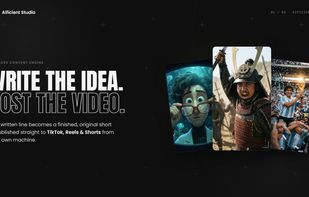
Aificient Studio is a place to create content with AI — all of it, in one studio. You bring the idea, the app handles everything a production team would: concept, script, visuals, voices, sound, captions, and even hitting publish.
Aificient Studio screenshot 1

Cost / License

  • Freemium (Subscription)
  • Proprietary

Application type

Platforms

  • Online
  • Software as a Service (SaaS)
1like
0articles

Features

Properties

  1.  Lightweight
  2.  AI-Powered

Features

  1.  Image to Image Generation
  2.  Non Destructive Editing
  3.  Text to Image Generation
  4.  Transitions Effects
  5.  Support for 4K
  6.  Hardware Accelerated
  7.  Ad-free
  8.  Keyframe Animation
  9.  Dark Mode

Aificient Studio News & Activities

Highlights All activities

Recent activities

Aificient Studio information

Aificient Studio was added to AlternativeTo by Sabino Quiros Garcia on and this page was last updated .
No comments or reviews, maybe you want to be first?

Official Links

What is Aificient Studio?

Aificient Studio is a place to create content with AI — all of it, in one studio. You bring the idea, the app handles everything a production team would: concept, script, visuals, voices, sound, captions, and even hitting publish.

Write a single line and it becomes a finished vertical video, a looping motion poster, or a promo for your brand. Give the studio a recurring character — even one made from a real photo — and your content keeps a consistent identity across every post, in any of nine artistic styles. It's built for creators running faceless channels, and just as much for brands that need a steady stream of ads and promotional content without a production team.

The loop closes inside the studio: connect your TikTok, Instagram Reels and YouTube Shorts accounts and publish or schedule directly — AI captions in your tone, trending sounds from TikTok's catalog, one account or many. Publishing runs through your own signed-in browser session, so your accounts never leave your machine.

Create in the browser or in the desktop app (Windows/macOS), rendering on your own GPU or an NVIDIA rented by the second. A finished minute of video costs around $0.30 — against $5+ on mainstream platforms — and the free tier has no time limit, so the quality speaks before any payment does.

