

Anvil text editor icon

Anvil text editor

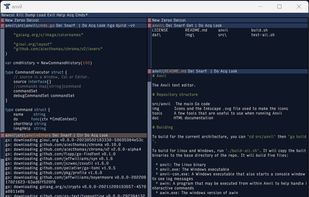
Anvil is a graphical, multi-pane tiling editor that makes bold use of the mouse and integrates closely with the shell. It supports syntax highlighting, multiple cursors and selections, remote file editing, and contains a powerful text manipulation language.
Anvil text editor screenshot 1

Cost / License

  • Free
  • Open Source (MIT)

Application type

Platforms

  • Mac
  • Windows
  • Linux
  • BSD
  • FreeBSD
  • OpenBSD
1like
0articles

Features

Properties

  1.  Support for Themes

Features

  1.  Dark Mode
  2.  No Tracking
  3.  Ad-free
  4.  Portable
  5.  Syntax Highlighting
  6.  Support for scripting
  7.  Extensible by Plugins/Extensions
  8.  No registration required
  9.  Works Offline

Anvil text editor News & Activities

Highlights All activities

Recent activities

Anvil text editor information

AlternativeTo Category

Office & Productivity

GitHub repository

  •  24 Stars
  •  2 Forks
  •  3 Open Issues
  •   Updated  
View on GitHub

Popular alternatives

View all
Anvil text editor was added to AlternativeTo by kanobe on and this page was last updated .
No comments or reviews, maybe you want to be first?

Official Links

What is Anvil text editor?

Anvil is a graphical, multi-pane tiling editor that makes bold use of the mouse and integrates closely with the shell. It supports syntax highlighting, multiple cursors and selections, remote file editing, and contains a powerful text manipulation language.

Anvil is inspired by Acme. Acme-like editors such as Anvil follow the Unix philosophy of composing many small existing tools to solve a problem. They treat shell commands and pipelines as first class entities that can generate and manipulate text in your editor.

Anvil runs on Linux, Windows, macOS, FreeBSD and OpenBSD.

A more comprehensive list of features Anvil supports is:

  • Acme features such as integrated OS command execution, structural regular expressions, plumbing, and editing session persistence through dump and load
  • Syntax Highlighting
  • Multiple cursor and multiple selection support
  • Remote file editing and command execution over SSH
  • Extensibility through the REST API
  • Terminal emulation
  • Customizable key bindings
  • Numerous build-in editing commands
  • Appearance can be customized with themes