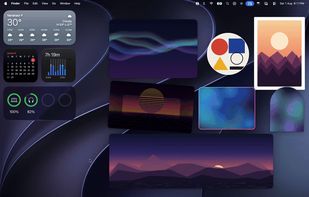
Placement. Each widget is its own window at its own dimensions. Layer any photo behind your desktop icons, above them, over macOS's own widgets, or floating above every app. Snapping works against other applications' windows too, with no accessibility permissions. A photo whose display disconnects hides, then returns to the same spot when that display comes back.
Getting photos in. ?V pastes a copied image straight onto the desktop. Drag files onto the menu bar icon. Pick up to 20 from your Photos library. Drag a rectangle to capture part of the screen and pin it. Import PDF pages. GIFs and APNGs animate, and cost no CPU while they do — the animation runs on the render server rather than a timer in the app.
Spaces. Pick several images and they become one widget that crossfades between them: on click, every 30 seconds, hourly, daily, or an interval you set down to 5 seconds. Each image keeps its own size and position. Sizing is either Dynamic, where each image takes its true ratio, or Fixed, where images fill a locked frame.
Style. Gallery, Polaroid, Minimal and Modern presets in one click, or set your own: shape mask (rounded rectangle, circle, squircle, arch), photo mat, two-layer shadow, border, vignette, and a few degrees of tilt so a cluster looks scattered rather than gridded.
Privacy. Photos can stay visible to you while staying out of screen shares and recordings. Optional auto-hide during calls, best effort, for Zoom, Teams, QuickTime and OBS. Optional hide behind fullscreen apps, which also stops rotation timers.
Automation. A global hotkey hides every photo and brings them back, ??P by default. Seven App Intents drive Arras from Shortcuts and Siri. Export your whole desktop setup as a .arras file and import it on another Mac.



 Yashashwi Singhania


