Simple, secure email automation for macOS.
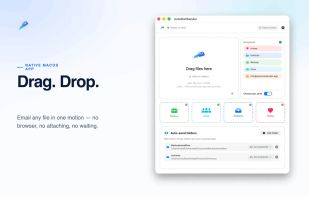
Send files via email with a simple drag-and-drop. AutoMailSender is a lightweight productivity tool designed for macOS users who regularly send files via SMTP.
KEY FEATURES:
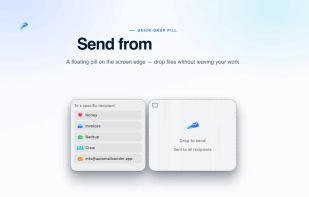
• Drag & Drop Simplicity: Drop any file onto the app window to send it instantly via email. No complicated dialogs, no extra clicks - just drag, drop, and done.
• Multi-Provider Support: Works with Gmail, Outlook, Yahoo, iCloud, and any custom SMTP server. Configure once, use forever.
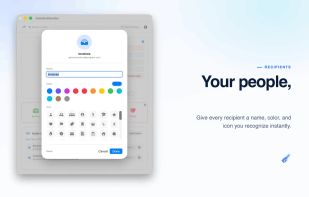
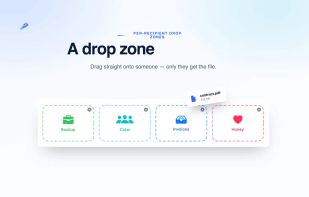
• Bulk Recipients: Send files to multiple recipients simultaneously. Perfect for photographers sharing albums, businesses sending invoices, or teachers distributing materials.
• 18 Languages: Full interface translation in 18 languages including English, Nederlands, Français, Deutsch, Español, Italiano, and many more.
• Privacy-Focused
- NO tracking or analytics
- NO ads
- First 200 emails free, then one-time upgrade available
- NO data collection
- All credentials stored securely in macOS Keychain
- Everything stays on your Mac
• Secure & Encrypted
- Email credentials encrypted in macOS Keychain
- TLS/SSL encryption for SMTP connections
- Sandboxed for maximum security
- No external servers or data transmission (except to your SMTP server)
• Smart File Handling
- Automatic file validation
- Size limit checking (respects provider limits)
- Blocked file type protection for security
- Supports all common file formats
• Dark Mode Compatible: Seamlessly adapts to macOS system appearance with Light, Dark, and Auto modes.
• Built-in Help System: Comprehensive SMTP setup guides for Gmail, Outlook, iCloud, and Yahoo, plus troubleshooting tips and privacy information.
PERFECT FOR:
- Photographers sharing client galleries
- Businesses sending invoices and documents
- Teachers distributing course materials
- Designers sharing mockups and assets
- Anyone who regularly sends files via email
REQUIREMENTS:
- macOS 14.0 (Sonoma) or later
- SMTP email account (Gmail, Outlook, etc.)
- App-specific password recommended for security
GETTING STARTED:
- Click Settings and choose your email provider
- Enter your email and app-specific password
- Add recipient email addresses
- Drag & drop files to send!
SECURITY & PRIVACY:
AutoMailSender takes your privacy seriously:
- Uses macOS Keychain for credential storage
- No third-party analytics or tracking
- No advertising networks
- No cloud storage - everything stays local
- Open about data handling (see Privacy Policy)
SUPPORTED PROVIDERS:
- Gmail (requires App Password)
- Outlook / Hotmail (requires App Password)
- Yahoo Mail (requires App Password)
- iCloud Mail (requires App-Specific Password)
- Office365
- Any custom SMTP server
Free to start with 200 emails. One-time upgrade for unlimited sending. No subscriptions. No data collection. Just simple, reliable file sending.