Azure DevOps Time Tracker icon

Azure DevOps Time Tracker

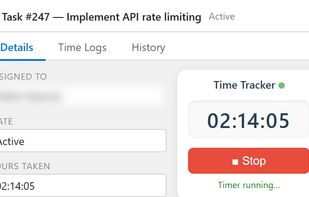
Embedded inside Azure Boards. One click to start. One click to stop. Every billable hour captured automatically and a live dashboard that finally tells you where your team’s time actually goes.
Azure DevOps Time Tracker screenshot 1

Cost / License

  • Freemium (Subscription)
  • Proprietary

Application type

Platforms

  • Microsoft Azure
  • Azure DevOps
0likes
0comments
0articles

Features

Properties

  1.  Privacy focused
  2.  Lightweight
  3.  Distraction-free

Features

  1.  Task Time Tracking
  2.  Cloud Sync
  3.  Goal Setting
  4.  No Tracking
  5.  Calendar Integration
  6.  Goal Tracking
  7.  Real time collaboration
  8.  Recurring Tasks
  9.  Subtasks
  10.  Calendar View
  11.  Reminders
  12.  Works Offline
  13.  Ad-free
  14. Azure DevOps icon  Azure DevOps integration

Azure DevOps Time Tracker News & Activities

Highlights All activities

Recent activities

Azure DevOps Time Tracker information

  • Developed by

    US flagQServices Inc
  • Licensing

    Proprietary and Freemium product.
  • Pricing

    Subscription that costs $1 per month + free version with limited functionality.
  • Alternatives

    3 alternatives listed
  • Supported Languages

    • English
Azure DevOps Time Tracker was added to AlternativeTo by QServices Inc on and this page was last updated .
No comments or reviews, maybe you want to be first?

What is Azure DevOps Time Tracker?

Azure DevOps Time Tracker is a time-tracking solution built specifically for Azure DevOps that helps teams capture work hours directly within Azure Boards work items. Instead of relying on spreadsheets, external tools, or end-of-week manual entries, developers can start and stop timers from the work items they already use every day.

The tool automatically associates time entries with specific work items, projects, and team members, providing real-time visibility into effort spent across tasks and client projects. Managers gain access to live dashboards, reporting, and utilization insights, while teams benefit from more accurate sprint planning, billing, and resource allocation.

Key features include:

Time tracking embedded directly inside Azure DevOps work items One-click start and stop timers Automatic time capture linked to tasks and user stories Real-time reporting and dashboards Team and project-level visibility CSV exports and billing reports Azure AD / Microsoft Entra ID authentication Quick installation through the Azure DevOps Marketplace

Azure DevOps Time Tracker Videos
