
Blueberry icon
Blueberry icon

Blueberry

Blueberry is a gnome-bluetooth front-end, Blueberry works on any desktop environment and should work on any distribution as long as gnome-bluetooth is installed. It is an application which configures Bluetooth.
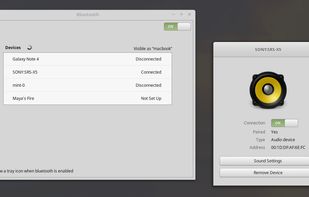
Blueberry screenshot 1

Cost / License

Platforms

  • Linux
0likes
0articles

Features

No features, maybe you want to suggest one?

Blueberry News & Activities

Highlights All activities

Recent activities

No activities found.

Blueberry information

GitHub repository

  •  212 Stars
  •  50 Forks
  •  45 Open Issues
  •   Updated  
View on GitHub
Blueberry was added to AlternativeTo by rstreeter78 on and this page was last updated .
No comments or reviews, maybe you want to be first?

Official Links

What is Blueberry?

Blueberry is a gnome-bluetooth front-end, Blueberry works on any desktop environment and should work on any distribution as long as gnome-bluetooth is installed. It is an application which configures Bluetooth. It shows a systray icon in your panel and doesn’t annoy you if you don’t have a Bluetooth adapter. It also detects your desktop environment and integrates with it. For instance, if you clicked the “Sound Settings” button shown in the above screenshot, it would know whether to launch “cinnamon-settings sound”, “gnome-control-center sound”, “mate-volume-control”, “pavucontrol”, etc… depending on the desktop you’re currently running. It supports Cinnamon, MATE, Xfce, GNOME and Unity.

