BugShot icon
BugShot icon

BugShot

Open-source Chrome side panel that turns a browser bug into a complete report — screenshot or recording plus console, network, and action logs — and files it straight to Jira, GitHub, Linear, Notion, GitLab, Asana, ClickUp, or Slack.
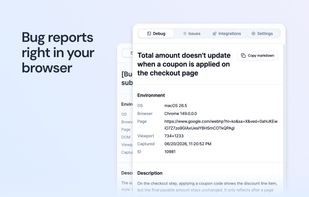
Bug reports right in you browser

Cost / License

  • Free
  • Open Source (MIT)

Application type

Platforms

  • Google Chrome
5likes
0articles

Features

Properties

  1.  Privacy focused
  2.  Local-First

Features

  1.  No Tracking
  2.  Annotate Screenshot
  3.  Dark Mode
  4.  No registration required
  5.  Screen Recording
  6.  Issue Tracking
  7.  Web page Debugging
  8.  HTTP(S) Debugging
  9.  Bug reporting

BugShot News & Activities

Highlights All activities

Recent activities

  • diegozpy liked BugShot
  • svg_garagemade reviewed BugShot  

    As someone who files bugs solo, the part that sells me is that it captures the context automatically — console, network, and the action log alongside the screenshot or recording. Half of every bug report is usually me trying to reconstruct what led up to it; having that attached from the start removes the tedious part. The direct hand-off to GitHub and Linear (and the fact that it's open-source and a side panel, so it stays out of the way) makes it something I'd actually keep pinned. Nice work.

  • svg_garagemade liked BugShot
  • sinhyeokkang updated BugShot
  • sentipulse added Issue Tracking as a feature to BugShot
  • sentipulse added Lightweight as a feature to BugShot
  • sinhyeokkang added Screenshot Capture as a feature to BugShot
  • sinhyeokkang added Screen Recording as a feature to BugShot
  • sentipulse liked BugShot
  • sentipulse reviewed BugShot  

    I really like the idea behind BugShot. So much time is usually wasted trying to explain a bug, collect screenshots, reproduce it, and gather logs. Having all that context captured automatically in one place could make reporting issues much faster and less frustrating for both testers and developers. The fact that it's open source and privacy-focused is another big plus for me.

BugShot information

AlternativeTo Categories

DevelopmentWeb BrowsersVideo & Movies

GitHub repository

  •  18 Stars
  •  2 Forks
  •  1 Open Issues
  •   Updated  
View on GitHub

Popular alternatives

View all

Our users have written 2 comments and reviews about BugShot, and it has gotten 5 likes

BugShot was added to AlternativeTo by sinhyeokkang on and this page was last updated .

Comments and Reviews

   
Top Positive Comment
Viktor Korobov
0

I really like the idea behind BugShot. So much time is usually wasted trying to explain a bug, collect screenshots, reproduce it, and gather logs. Having all that context captured automatically in one place could make reporting issues much faster and less frustrating for both testers and developers. The fact that it's open source and privacy-focused is another big plus for me.

svg_garagemade
0

As someone who files bugs solo, the part that sells me is that it captures the context automatically — console, network, and the action log alongside the screenshot or recording. Half of every bug report is usually me trying to reconstruct what led up to it; having that attached from the start removes the tedious part. The direct hand-off to GitHub and Linear (and the fact that it's open-source and a side panel, so it stays out of the way) makes it something I'd actually keep pinned. Nice work.

Review from a new or low-activity account — shown here, but not counted in the app rating.

Official Links

What is BugShot?

BugShot is an open-source Chrome side panel that turns a bug you just saw into a report your team can act on — without leaving the page. Capture the problem, and BugShot collects the context automatically: environment details, console output, network requests, and a step-by-step action log. Review it in the panel, then send it straight to your issue tracker or Slack.

CAPTURE

  • Element picker — hover to highlight, click to select any DOM element, including one level into cross-origin iframes.
  • Area, viewport, and full-page capture — drag a region, grab the visible screen, or scroll and stitch a whole page into one tall screenshot.
  • Annotate with arrows, pen, text, shapes, and highlights.

RECORDING

  • Record the tab or your screen for up to 60 seconds, encoded to MP4, and draw on the page while recording — the markup is baked into the video.
  • 30-second Replay: an opt-in, always-on buffer that keeps the last 30 seconds across page navigations, so you can catch the bug after you spot it.
  • Trim before filing, and the attached logs narrow to match.

LIVE STYLING AND CSS DIFFS

  • Edit an element's layout, spacing, color, typography, and borders live on the page, through structured fields or a syntax-highlighted CSS editor.
  • Every change becomes a before/after table plus paired before/after screenshots, so developers see exactly which properties to change.
  • Resolves var() chains and reports the design token name, not a raw computed value.

LOGS

  • Console and network logs captured automatically, including WebSocket frames and logs from cross-origin iframes, filterable by origin.
  • Action log records clicks, text input, navigations, and shortcuts as reproduction steps, with sensitive values masked.
  • A standalone log viewer with a video-synced timeline: click any entry to jump to that moment in the recording.

AI, OPTIONAL Bring your own key for OpenAI, Anthropic, Gemini, and more, or fall back to Chrome's built-in AI. It drafts the title and body from your capture, writes CSS from a plain-language request, and fills in reproduction steps from the action log.

INTEGRATIONS Jira, GitHub, Linear, Notion, GitLab, Asana, ClickUp, and Slack, via OAuth or a personal token. Set a default destination, assignee, label, and issue type once, and every new report comes pre-filled. Attachments upload natively.

PRIVACY BY ARCHITECTURE There is no BugShot account, no hosted workspace, and no BugShot server in the data path. Screenshots, recordings, logs, and report bodies are assembled inside the extension and sent straight to the destination you connected, with your own credentials. AI requests go directly to the endpoint you chose. The only BugShot-operated endpoint is an OAuth token-exchange proxy that never carries capture data. It is open source under the MIT license, so the architecture can be inspected rather than trusted.

BugShot is free, with no paid tier planned. Requires Chrome 116 or later. Interface in English and Korean.
