





Cadran
1 like
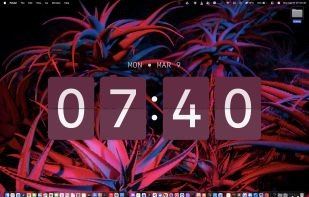
Cadran is a native macOS app that places a clock directly on your desktop wallpaper — behind your icons, across every Space and display. Unlike widgets or floating windows, it renders at the wallpaper layer so it's always visible without getting in the way of your work.

Cost / License
- Freemium (Pay once)
- Proprietary
Application type
Platforms
- Mac


Features
Cadran News & Activities
Highlights All activities
Recent activities
- Ilyomix liked Cadran
- Ilyomix added Cadran
 Ilyomix added Cadran as alternative to Fliqlo Screensaver, Nixie, Aerial Views screensaver and XScreenSaver


Cadran information
Developed by
Ilyes Abd-LillahLicensing
Proprietary and Freemium product.Pricing
One time purchase (perpetual license) that costs up to $10 + free version with limited functionality.Alternatives
8 alternatives listedBadge
Get an embeddable badge for CadranSupported Languages


No comments or reviews, maybe you want to be first?