

Ceres Assistant icon

Ceres Assistant

An AI assistant that lives in your browser and code editor to write, rewrite, improve, translate and develop everything you are working on, using browser On-Device AI.
Ceres Assistant screenshot 1

Cost / License

  • Freemium (Pay once)
  • Proprietary

Application type

Platforms

  • Mac  Available via a PWA or a VS Code/JetBrains plugin.
  • Windows  Available via a PWA or a VS Code/JetBrains plugin.
  • Linux  Available via a PWA or a VS Code/JetBrains plugin.
  • Google Chrome
  • Online  Available via a PWA or a VS Code/JetBrains plugin.
1like
0articles

Features

Properties

  1.  Lightweight
  2.  Privacy focused
  3.  AI-Powered

Features

  1.  Works Offline
  2.  Code Formatting
  3.  Text to Speech
  4.  Text to Image Generation
  5.  No Coding Required
  6.  Spell Checking
  7.  Ad-free
  8.  VSCode
  9.  Local AI
  10.  AI Writing
  11.  Voice recognition
  12.  Browser extension
  13.  AI Chatbot

Ceres Assistant News & Activities

Highlights All activities

Recent activities

Ceres Assistant information

  • Developed by

    Unknown
  • Licensing

    Proprietary and Freemium product.
  • Pricing

    One time purchase (perpetual license) that costs up to $29 + free version with limited functionality.
  • Alternatives

    32 alternatives listed
  • Badge

    Get an embeddable badge for Ceres Assistant
  • Supported Languages

    • English
Ceres Assistant was added to AlternativeTo by Andreas Express on and this page was last updated .
No comments or reviews, maybe you want to be first?

Official Links

What is Ceres Assistant?

Ceres is an AI assistant that runs as an extension for Chrome, Edge, and Opera, and as an add-on for VS Code and JetBrains IDEs, mostly helpful for dictating and re-writing tasks inside the browser with on-device AI.

It works as an AI assistant with writing tools. It can rewrite, correct and expand text inside any text field, fix grammar, translate text and summarize pages, using your browser's built-in on-device AI or the provider you connect through your own API key (OpenAI, Claude, Gemini, DeepSeek, Ollama or any OpenAI-compatible API). You can use the allready defined writting buttons or add more writting buttons as your writting styles goes.

Unlike many other tools, Ceres seamlessly preserves your original HTML and text formatting when rewriting.

It also includes voice commands: you can rewrite a selected piece of text or dictate a prompt by speaking instead of typing. With voice commands, your text or code will be transformed and inserted into the field without copying and pasting text from separate apps.

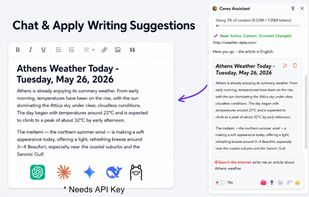
AI sidebar can use the current tabs, PDFs and selected local files as context, so you can ask questions about what you are looking at, compose or improve articles, and apply suggestions directly on the page. and the navigation / agent mode can search the internet to gather context for a request.

The same assistant is available inside the browser or a code editor. In the browser, it can help you with writing and research. In VS Code and JetBrains IDEs, it can search within your project files to find relevant context, answer questions, and suggest code changes, which you review before applying. You can connect the LLM provider you prefer, as it is designed to run with low-cost or local models. What makes Ceres for VS Code different is that it is designed for focused AI help and seamless interaction between the code editor and sidebar, rather than acting as a separate AI agent in its own sidebar.

Ceres is working with browser local ai functionality, or you can connect to your own ai models through your own API key.