Chrono Mock icon
Chrono Mock icon

Chrono Mock

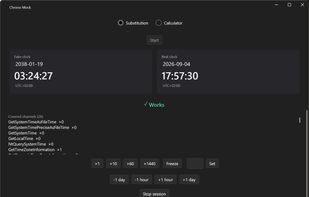
Run any Windows app at a different date without touching the system clock - and know whether it worked, change time speed: freeze or accelerate the clock. GUI + CLI, portable.
Chrono Mock screenshot 1

Cost / License

Platforms

  • Windows
0likes
0articles

Features

No features, maybe you want to suggest one?

Chrono Mock News & Activities

Highlights All activities

Recent activities

Chrono Mock information

GitHub repository

  •  2 Stars
  •  0 Forks
  •  1 Open Issues
  •   Updated  
View on GitHub
Chrono Mock was added to AlternativeTo by DonislawDev on and this page was last updated .
No comments or reviews, maybe you want to be first?

Official Links

What is Chrono Mock?

Chrono Mock is a tool for testers and developers: run one application as if it were a different date, and find out whether it actually worked. Set the clock to next year, freeze it, or speed it up so a 30-day trial expires in half an hour. The rest of the machine keeps the real time - your domain logon, your certificates and every other application carry on as normal.

What it can do:

  • Any moment, absolute or relative - a specific date and time, or +30 days, -1 year. Flowing, frozen, or accelerated - run from the shifted point at normal speed, hold the clock still, or multiply it by any whole number up to a million (x1440 turns a day into a minute).
  • Jump mid-session - forward or backward, including the backward jump a laptop makes after resyncing with a time server, which breaks anything measuring elapsed time without a guard.
  • Its own time zone - a fixed offset for that process only, while the system zone stays put.
  • Child processes come along - installers and launchers spawn children, and without that the test covers only half of what ran.
  • Tells you if it worked - a verdict, the channels covered with call counts, the channels missed, and warnings with consequences. See below - this is the part no other tool does.
  • A date calculator built for QA - month-end, quarter close, the 2038 boundary, "the first day after a 14-day trial", business days and holidays, every format at once.
  • Electron and Chromium apps too - through a different mechanism, because their clock lives in a sandboxed renderer where injection does not reach.
  • A window and a command line - the same engine behind both, exit codes for CI.

There is also built-in date calculator

The other half of date testing is knowing which date to use. Chrono Mock includes a calculator that speaks in QA terms rather than arithmetic:

  • Build the expression from controls, not from a sentence - a starting point plus steps (- 18 years, - 1 day, set time 23:59:59), with the intermediate result shown after each step
  • Presets that explain what they catch - trial end, month-end and quarter close, year-end rollover, epoch 0, the 2038 boundary
  • Every format at once, one click to copy - ISO 8601, MM/dd/yyyy, dd.MM.yyyy, epoch seconds and milliseconds, FILETIME, RFC 1123, and a custom mask to match whatever the application under test expects
  • Reverse direction - paste a date from a log and get "3 days before quarter end", "Saturday, not a business day". When the format is ambiguous, both readings are shown rather than one guessed
  • Business days and holidays - United States and Poland at launch, including the US rule where a holiday landing on a Saturday is observed on the preceding Friday

Any calculated date goes straight into a time-shift session with one click.

