How it works
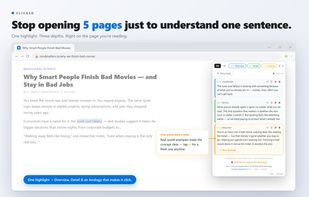
Highlight a word, sentence, or paragraph on any page.
An explanation appears next to it — at three depths you tap through:
Overview — the ten-second version
Detail — the full picture
Analogy — a real-world example that makes it stick (tap ? for a fresh one anytime)
Keep reading. That's the whole workflow.
Works on webpages and PDFs, in 15+ languages — read in any of them, get it explained in yours.
What people use it for
Language learning — read foreign-language news and books with in-context explanations in your own language. Tap to hear any explanation read aloud, so you get the pronunciation too. An AI dictionary that translates meaning, not just words.
Studying — make sense of dense papers and contracts one paragraph at a time; get an "explain like I'm five" version; trim explanations or add your own notes as you read, or later in your private library where every term is kept.
Everyday reading — finance jargon, legal clauses, medical terms, code snippets, internet slang (there's a Slang mode that explains things in a casual, internet-native voice).
Your library
Tap 🔖 on any explanation to save it. The library is yours to shape:
Edit it — before or after saving. Trim the explanation down to what you actually need, or add your own note. Do it in the popup as you read, or later in the library. Edited cards are marked so you know which ones you've reworked.
Organize into folders — create folders in the library and file your saved explanations into them. View everything at once, or narrow down to a single folder.
Export to Anki, Quizlet, or Vaia — whichever one you already use — and review your saved terms on your phone in that app.
Private by default. Your library lives on your device — we never see or store it. Nothing leaves unless you export it yourself.
Privacy is a founding principle
Clicked sees only the words you highlight — never the rest of the page, your browsing history, or your other tabs.
Your saved library lives on your device. We never see or store it.
Domain blocking built in: banking, email, and health sites are pre-blocked (gmail, major banks, brokerages, patient portals) and you can add any site.
Bring-your-own-key plan: your API key is stored locally and never touches our servers.
Full policy: tryclicked.app/privacy
Pricing
Free trial: 50 explanations over 7 days, no credit card.
Free tier: 3 explanations a day, no time limit.
Subscription: $2 first month, then $5/month for 500 explanations.
Annual / BYO-key: $20/year with your own Gemini, OpenAI, or Anthropic key.







 Bluebonnet software