What is Clipboard Manager?
A lightweight, high-performance clipboard manager for Windows built with Electron.js. It focuses on solving the "25-item limit" of Windows + V without the clutter and outdated interface of legacy tools like Ditto. It’s designed to be a fast, local utility that organizes your data as you copy it.
Where it’s better than the defaults:
- Reliable Capacity
100-Item History: Windows + V caps at 25 and often resets. This tool maintains a consistent, stable history of your last 100 clips across sessions.
Optimized Performance: Uses a 500ms polling interval and an asynchronous backend to ensure that even with 100 items, there is zero impact on your typing or system speed.
- Intelligent Organization
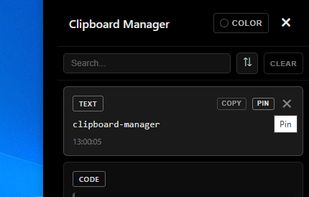
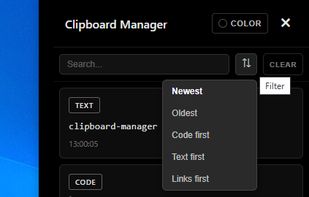
Automatic Categorization: The tool scans every clip and instantly sorts it into CODE, TEXT, or LINK categories. You don't have to search through one long list to find a URL you copied an hour ago.
Type-Specific UI: Each category is treated differently, making it easier to scan for snippets versus plain text.
- Built for Customization
Global Hotkey System: A dedicated system-wide shortcut to bring the manager to the front instantly, no matter what app you’re in.
Developer-Friendly: Because it’s built with Electron/JavaScript, the logic for how it handles "CODE" snippets is designed specifically for programmers who need to store and retrieve syntax frequently.
- Simplicity & Privacy
It runs as a clean, portable utility with a modern CSS-driven interface.
100% Local: Your clipboard data never leaves your machine. There is no cloud syncing and no telemetry—just a private local database.
Vs. Windows + V: We give you 4x the storage and automatic sorting into Code/Links.
Vs. Ditto: We offer a modern UI and a simpler, less confusing setup for people who just want their history back.











 malkimson added Clipboard Manager by Malkimson as alternative to Ditto